> ## Documentation Index
> Fetch the complete documentation index at: https://greatquestion.co/support/llms.txt
> Use this file to discover all available pages before exploring further.
# Incentives 101
> What research incentives are, the reward types Great Question supports, and how to turn them on for a study.
Incentives are rewards you offer participants in exchange for their time and insights. A well-chosen incentive lifts your participation rate and encourages people to show up prepared and give you thoughtful feedback. This guide covers the reward types Great Question supports and how to enable incentives on a study.
## Reward types
Great Question supports several ways to reward participants. Choose the method that best fits your audience and how you want to handle payment.
| Method | What it is | Best for |
| -------------- | ---------------------------------------------------------------------------------------------------------------------------------------------------------------- | ------------------------------------------------------------------------ |
| **Tremendous** | Digital rewards fulfilled through Tremendous. Participants choose their payout — Visa reward cards, PayPal, bank transfer, gift cards, or a charitable donation. | Most studies, especially when participants want to pick their own reward |
| **Coupon** | A discount code from a pool you preload. | Rewarding your own customers with account credit or a promo |
| **Product** | A product-based reward such as an account upgrade or free plan. | Studies where the reward is your own product |
| **Manual** | You fulfill the reward yourself, outside of Great Question. | Swag, physical gifts, or any reward you handle directly |
| **Other** | Any arrangement managed entirely outside the platform. | External fulfillment handled by you or a recruiting partner |
Digital rewards through **Tremendous** support a wide range of currencies, so you can pay participants in their local currency.
## How to enable incentives
You set an incentive when you build your study.
1. Open your study and go to the **Plan** tab.
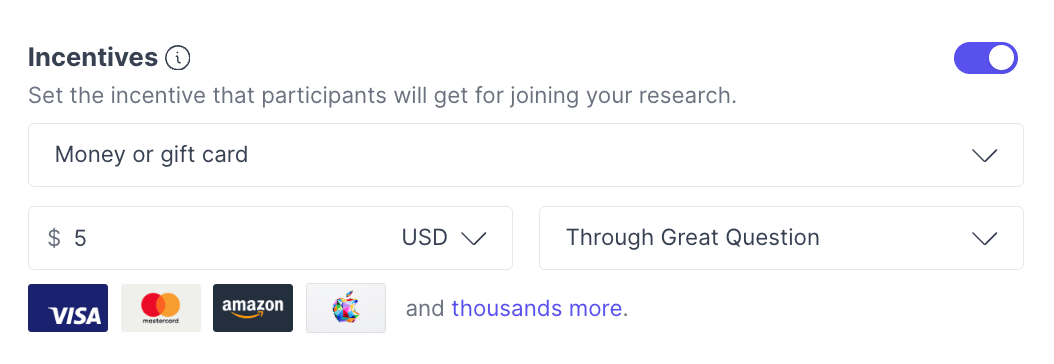
2. Toggle on the **Incentive** option.
3. Choose the incentive type — **Money or gift card**, **Coupon code**, **Product gift**, or **Other**.
4. If you chose **Money or gift card**, also pick how it's funded: **Through Great Question** (Tremendous) or **Outside of Great Question** (you handle payment yourself). Then set the amount.
 Match the reward to your audience, and make sure the amount reflects how much of the participant's time you're asking for. See the [Incentives FAQ](/support/support/incentives/incentives-faq) for recommended amounts by study type.
## Troubleshooting setup
A few common issues to check when an incentive doesn't behave as expected:
| Issue | How to fix it |
| ----------------------------------------------------- | ------------------------------------------------------------------------------------------------------------------------------------------------------------------------------------------------------------------- |
| No incentive was offered | Confirm the **Incentive** box is checked on the **Plan** tab. |
| Participant didn't get their reward | Check that the participant's email isn't bouncing or blocked, then resend the thanks message. Also confirm your wallet has enough unallocated funds, Tremendous rewards won't send if the study's funding is short. |
| Coupon codes ran out | Preload more codes. If the pool runs out, fulfillment fails silently rather than notifying you, so it's worth checking your remaining code count before a study picks up volume. |
| Wrong amount was sent | Verify the amount on the **Plan** tab, or update it per participant before the thanks message is sent. |
| Reward wasn't fulfilled through Great Question | Make sure you didn't select **Outside of Great Question** or the manual/external option by mistake. |
| Can't offer only specific gift cards (e.g. only Visa) | Not currently supported — participants choose from Tremendous's full catalog of payout options. |
For the full walkthrough on delivering rewards, see [How to Send Incentives](/support/support/incentives/how-to-send-incentives).
***
**Still need help?** Contact us at [support@greatquestion.co](mailto:support@greatquestion.co) — median response time is 19 minutes during [support hours](https://greatquestion.co/features/about-our-support-team).
Match the reward to your audience, and make sure the amount reflects how much of the participant's time you're asking for. See the [Incentives FAQ](/support/support/incentives/incentives-faq) for recommended amounts by study type.
## Troubleshooting setup
A few common issues to check when an incentive doesn't behave as expected:
| Issue | How to fix it |
| ----------------------------------------------------- | ------------------------------------------------------------------------------------------------------------------------------------------------------------------------------------------------------------------- |
| No incentive was offered | Confirm the **Incentive** box is checked on the **Plan** tab. |
| Participant didn't get their reward | Check that the participant's email isn't bouncing or blocked, then resend the thanks message. Also confirm your wallet has enough unallocated funds, Tremendous rewards won't send if the study's funding is short. |
| Coupon codes ran out | Preload more codes. If the pool runs out, fulfillment fails silently rather than notifying you, so it's worth checking your remaining code count before a study picks up volume. |
| Wrong amount was sent | Verify the amount on the **Plan** tab, or update it per participant before the thanks message is sent. |
| Reward wasn't fulfilled through Great Question | Make sure you didn't select **Outside of Great Question** or the manual/external option by mistake. |
| Can't offer only specific gift cards (e.g. only Visa) | Not currently supported — participants choose from Tremendous's full catalog of payout options. |
For the full walkthrough on delivering rewards, see [How to Send Incentives](/support/support/incentives/how-to-send-incentives).
***
**Still need help?** Contact us at [support@greatquestion.co](mailto:support@greatquestion.co) — median response time is 19 minutes during [support hours](https://greatquestion.co/features/about-our-support-team).