> ## Documentation Index
> Fetch the complete documentation index at: https://greatquestion.co/support/llms.txt
> Use this file to discover all available pages before exploring further.
# SCIM
> Automate user provisioning, updates, and deprovisioning from Okta or any SCIM 2.0 identity provider, with group-to-role mapping and bearer token auth.
SCIM (System for Cross-domain Identity Management) lets your identity provider automatically create, update, and deactivate Great Question user accounts. This removes the need to manage users by hand and keeps access in sync with your directory. Great Question's SCIM endpoint is a standard SCIM 2.0 implementation, so it works with any compliant identity provider, this guide uses Okta as an example.
SCIM provisioning is available on **Enterprise** plans and is enabled by request.
## Why it matters
* **Eliminate manual user management.** Users are provisioned and deprovisioned automatically from your identity provider.
* **Strengthen your security posture.** When someone leaves your organization, their Great Question access is revoked immediately through your IdP.
* **Give new hires access from day one.** Users provisioned through SCIM can access Great Question as soon as they're assigned in your identity provider.
* **Keep roles and teams in sync.** Map IdP groups to Great Question roles and teams so access stays consistent.
## How to set up SCIM provisioning
### Step 1: Generate a SCIM token in Great Question
1. Click your name in the bottom-left corner and go to **Settings**.
2. Open **Governance > [Security](https://greatquestion.co/governance/security)** and click **Configure** next to SCIM configuration.
 3. Copy both the **SCIM Endpoint** (`https://api.greatquestion.co/scim/v2`) and the **bearer token**.
The bearer token is displayed only once. Copy it before leaving the page. If you lose it, you'll need to regenerate the token, and then update it in your IdP. Regenerating immediately invalidates the old token.
### Step 2: Create an app integration in your identity provider
Create the app integration that will connect your IdP to Great Question (for Okta, this is a new SCIM app integration).
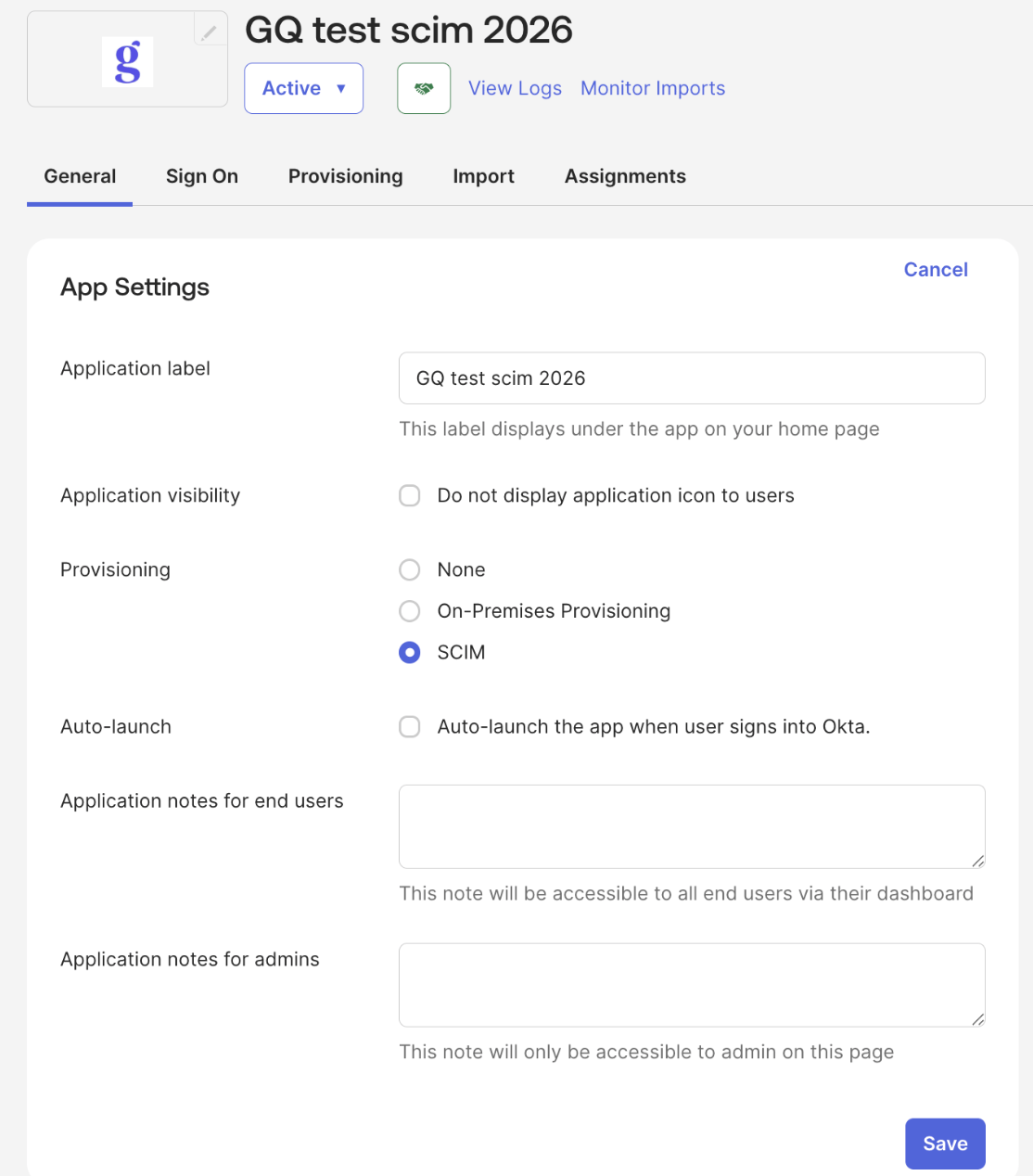
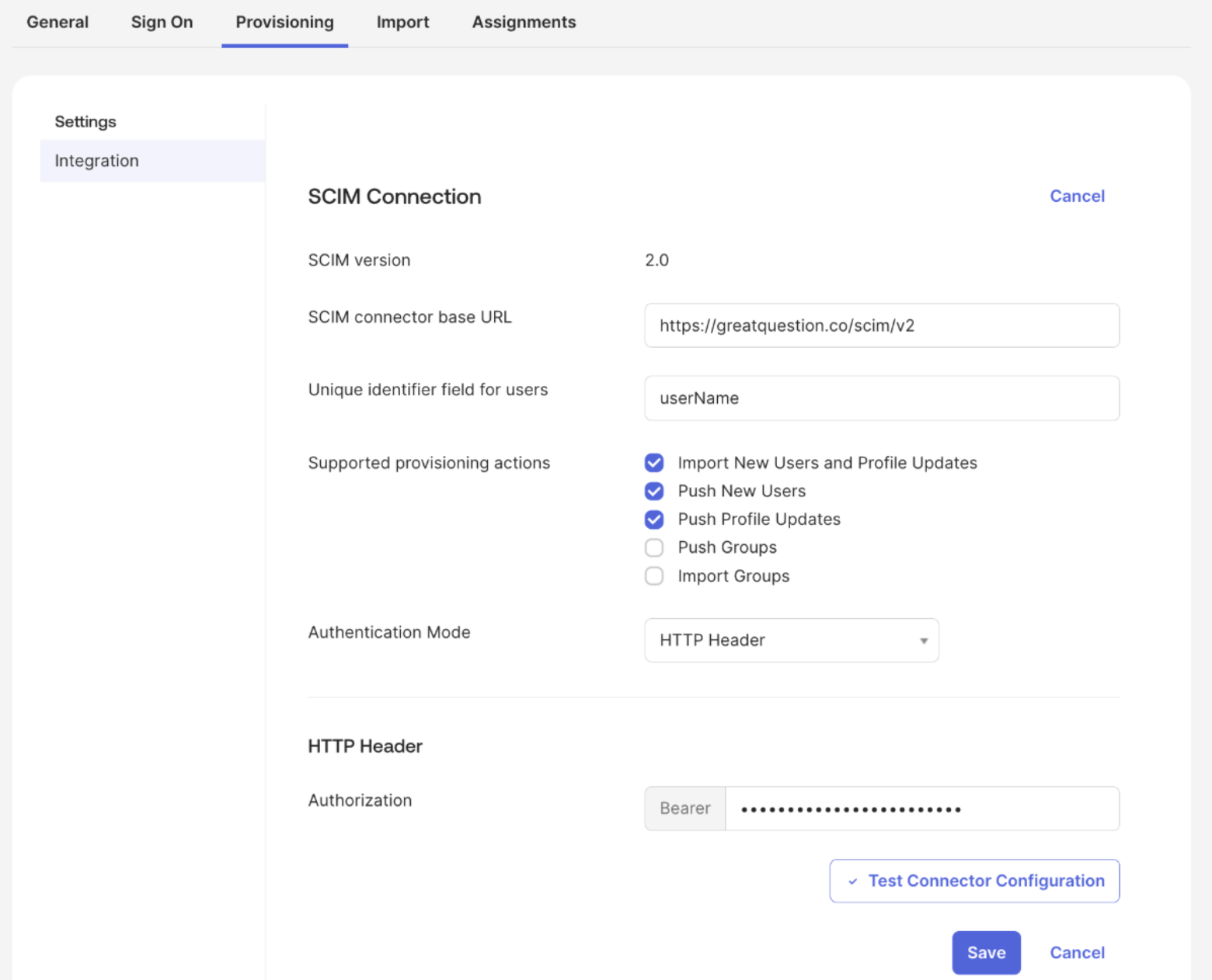
### Step 3: Configure SCIM in your identity provider
* Set the SCIM connector base URL to `https://api.greatquestion.co/scim/v2`.
* Set the unique identifier field to `userName`.
* Enable **Import New Users and Profile Updates**, **Push New Users**, and **Push Profile Updates**.
* Use **HTTP Header** (bearer token) authentication mode with the token from Step 1.
* Click **Test Connector Configuration** to verify the connection.
If the test succeeds, click **Save**.
3. Copy both the **SCIM Endpoint** (`https://api.greatquestion.co/scim/v2`) and the **bearer token**.
The bearer token is displayed only once. Copy it before leaving the page. If you lose it, you'll need to regenerate the token, and then update it in your IdP. Regenerating immediately invalidates the old token.
### Step 2: Create an app integration in your identity provider
Create the app integration that will connect your IdP to Great Question (for Okta, this is a new SCIM app integration).
### Step 3: Configure SCIM in your identity provider
* Set the SCIM connector base URL to `https://api.greatquestion.co/scim/v2`.
* Set the unique identifier field to `userName`.
* Enable **Import New Users and Profile Updates**, **Push New Users**, and **Push Profile Updates**.
* Use **HTTP Header** (bearer token) authentication mode with the token from Step 1.
* Click **Test Connector Configuration** to verify the connection.
If the test succeeds, click **Save**.
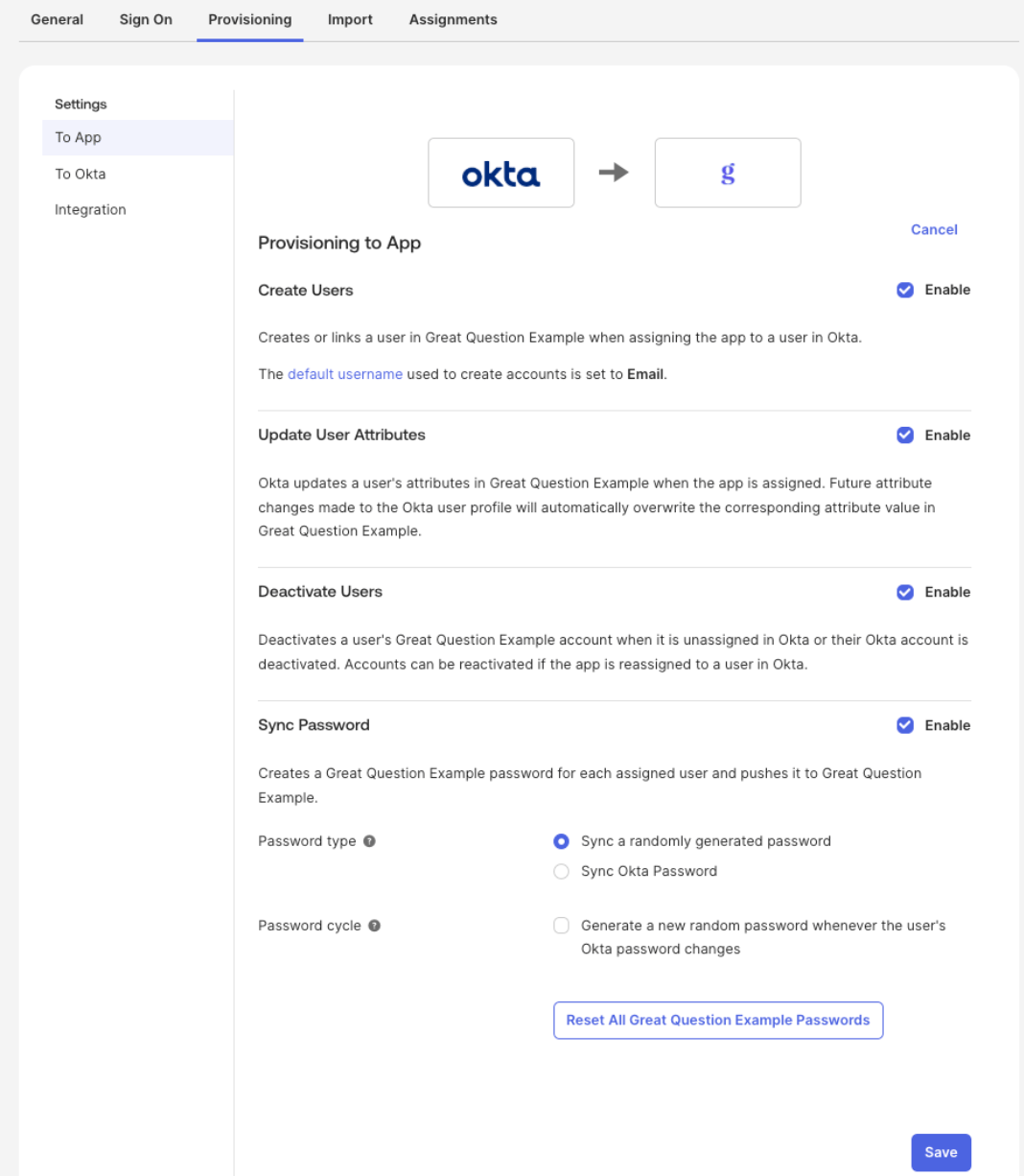
 ### Step 4: Enable provisioning to the app
Turn on the provisioning actions in your IdP — **Create Users**, **Update User Attributes**, and **Deactivate Users**.
### Step 4: Enable provisioning to the app
Turn on the provisioning actions in your IdP — **Create Users**, **Update User Attributes**, and **Deactivate Users**.
 ### Step 5: Configure the default role and IdP-managed roles
* Choose the **default role** for users who don't have a group-to-role mapping (**Admin**, **Creator**, or **Observer**).
* Enable **IdP manages roles** to have your identity provider control role assignments. When this is on, manual role changes in Great Question are overwritten at the next sync. Note: the account owner's role can never be changed via SCIM.
* Groups map to roles or teams automatically.
### Step 6: Assign users in your identity provider
Assign users to the application to provision them into Great Question.
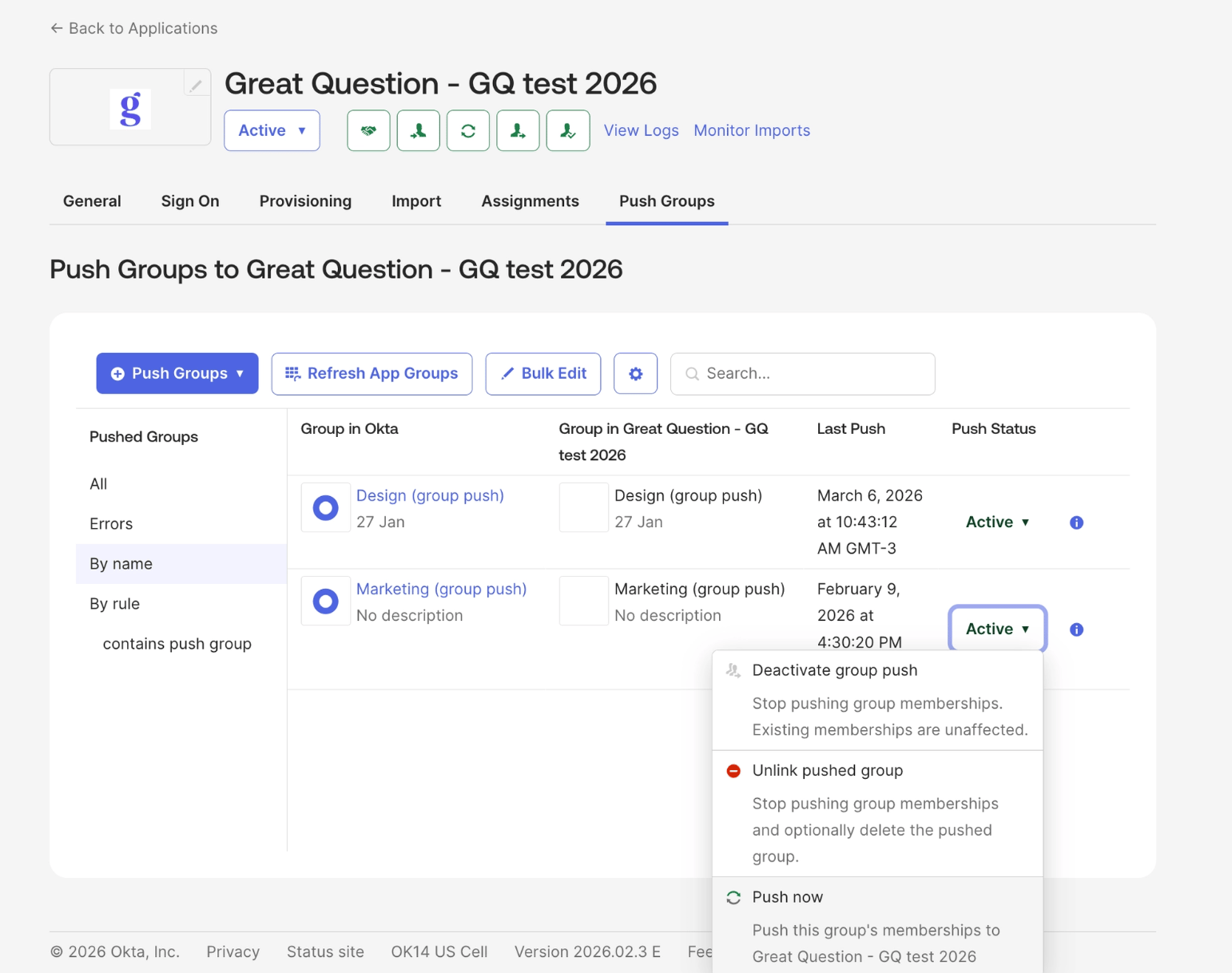
### Step 7: Push groups (optional)
Contact your Customer Success Manager or [support@greatquestion.co](mailto:support@greatquestion.co) to enable and configure grouping.
If you want to sync Okta groups for role or team mapping in Great Question:
* In Okta, go to the **Push Groups** tab.
* Click **Push Groups > Find groups by name**.
* Search for and select the groups you want to push, then click **Save**.
### Step 5: Configure the default role and IdP-managed roles
* Choose the **default role** for users who don't have a group-to-role mapping (**Admin**, **Creator**, or **Observer**).
* Enable **IdP manages roles** to have your identity provider control role assignments. When this is on, manual role changes in Great Question are overwritten at the next sync. Note: the account owner's role can never be changed via SCIM.
* Groups map to roles or teams automatically.
### Step 6: Assign users in your identity provider
Assign users to the application to provision them into Great Question.
### Step 7: Push groups (optional)
Contact your Customer Success Manager or [support@greatquestion.co](mailto:support@greatquestion.co) to enable and configure grouping.
If you want to sync Okta groups for role or team mapping in Great Question:
* In Okta, go to the **Push Groups** tab.
* Click **Push Groups > Find groups by name**.
* Search for and select the groups you want to push, then click **Save**.
 #### Okta Group Push: Configuration Guide
There are two behaviors to be aware of when configuring Group Push with Great Question.
##### Groups may arrive without members:
This happens when the same Okta group is used for both Application Assignment and Group Push. Okta may push the group before users are fully provisioned, resulting in an empty members list.
**Fix:** Use two separate groups, one for Application Assignment and one for Group Push. Make sure users are provisioned before the group push runs.
* **Application Assignment group** — used only to provision users into the app
* **Group Push group** — separate group used only for pushing memberships to Great Question
Using the same group for both Application Assignment and Group Push is not supported by Okta. See [About Group Push](https://help.okta.com/en-us/content/topics/users-groups-profiles/usgp-about-group-push.htm) and [Troubleshoot app assignment and group membership](https://help.okta.com/en-us/content/topics/users-groups-profiles/usgp-troubleshoot-group-push.htm) in Okta's documentation.
##### Membership removals may not sync automatically:
When a user is removed from a group in Okta, the change may not immediately reach Great Question. This can happen depending on how users are assigned to the app, if assigned via group rather than directly, Okta may not send the membership removal event. The user may still appear as a group member until the next reconciliation.
**Fix:** Trigger a manual sync from **Applications → Push Groups → \[select group] → Push Now**.
#### SCIM Push Groups Troubleshooting Guide
Problem 1: "Unable to update Group Push mapping target App group"
**Error message:**
`Failed: Unable to update Group Push mapping target App group mgmt-great-question-admin`
**Root cause:** There is a stale push mapping in Okta for the group. The constraint error `AppGroups.externalIdAndInstanceKey` occurs when Okta tries to create a new mapping for a group that already has a conflicting record in the app instance.
**Note**: This error appears to come from Great Question's side but is actually generated by Okta.
**Resolution:**
* In Okta, go to **Push Groups**
* Find the group with the error (e.g. `mgmt-great-question-admin`)
* Delete the existing push mapping
* Recreate the mapping — when the "Match result & push action" screen appears, select **"Create Group"** (not "Link Group")
* Click **"Push Now"**
* Verify the group appears with the correct members at `https://greatquestion.co/governance/scim_groups`
Okta reference: [https://support.okta.com/help/s/article/Unable-to-update-Group-Push-with-error-Unable-to-update-Group-Push-mapping-target-App-group](https://support.okta.com/help/s/article/Unable-to-update-Group-Push-with-error-Unable-to-update-Group-Push-mapping-target-App-group)
**Problem 2: Active Okta users failing SCIM provisioning — "User account is inactive"**
**Error message:**
`Automatic provisioning of user [X] to app Great Question failed: User account is inactive`
**Symptom:** Users appear active in Okta, but SCIM only sends GET requests (lookups) and group updates — no PUT/POST to `/Users`. Without a POST/PUT, no SCIM link is created for the user on Great Question's side.
**Root cause:** The **"Deactivate Users"** option under Okta's SCIM provisioning settings was not enabled. Without it, Okta cannot properly sync the user's lifecycle state with the app, which blocks provisioning.
**Resolution:**
1. In Okta, go to **Applications → Great Question → Provisioning → To App → Edit**
2. Enable **"Deactivate Users"** (in addition to "Push New Users" and "Push Profile Updates")
3. Save
4. Reassign the affected users to the application (individually or via group)
Confirm provisioning succeeded in the Okta logs.
#### Okta Group Push: Configuration Guide
There are two behaviors to be aware of when configuring Group Push with Great Question.
##### Groups may arrive without members:
This happens when the same Okta group is used for both Application Assignment and Group Push. Okta may push the group before users are fully provisioned, resulting in an empty members list.
**Fix:** Use two separate groups, one for Application Assignment and one for Group Push. Make sure users are provisioned before the group push runs.
* **Application Assignment group** — used only to provision users into the app
* **Group Push group** — separate group used only for pushing memberships to Great Question
Using the same group for both Application Assignment and Group Push is not supported by Okta. See [About Group Push](https://help.okta.com/en-us/content/topics/users-groups-profiles/usgp-about-group-push.htm) and [Troubleshoot app assignment and group membership](https://help.okta.com/en-us/content/topics/users-groups-profiles/usgp-troubleshoot-group-push.htm) in Okta's documentation.
##### Membership removals may not sync automatically:
When a user is removed from a group in Okta, the change may not immediately reach Great Question. This can happen depending on how users are assigned to the app, if assigned via group rather than directly, Okta may not send the membership removal event. The user may still appear as a group member until the next reconciliation.
**Fix:** Trigger a manual sync from **Applications → Push Groups → \[select group] → Push Now**.
#### SCIM Push Groups Troubleshooting Guide
Problem 1: "Unable to update Group Push mapping target App group"
**Error message:**
`Failed: Unable to update Group Push mapping target App group mgmt-great-question-admin`
**Root cause:** There is a stale push mapping in Okta for the group. The constraint error `AppGroups.externalIdAndInstanceKey` occurs when Okta tries to create a new mapping for a group that already has a conflicting record in the app instance.
**Note**: This error appears to come from Great Question's side but is actually generated by Okta.
**Resolution:**
* In Okta, go to **Push Groups**
* Find the group with the error (e.g. `mgmt-great-question-admin`)
* Delete the existing push mapping
* Recreate the mapping — when the "Match result & push action" screen appears, select **"Create Group"** (not "Link Group")
* Click **"Push Now"**
* Verify the group appears with the correct members at `https://greatquestion.co/governance/scim_groups`
Okta reference: [https://support.okta.com/help/s/article/Unable-to-update-Group-Push-with-error-Unable-to-update-Group-Push-mapping-target-App-group](https://support.okta.com/help/s/article/Unable-to-update-Group-Push-with-error-Unable-to-update-Group-Push-mapping-target-App-group)
**Problem 2: Active Okta users failing SCIM provisioning — "User account is inactive"**
**Error message:**
`Automatic provisioning of user [X] to app Great Question failed: User account is inactive`
**Symptom:** Users appear active in Okta, but SCIM only sends GET requests (lookups) and group updates — no PUT/POST to `/Users`. Without a POST/PUT, no SCIM link is created for the user on Great Question's side.
**Root cause:** The **"Deactivate Users"** option under Okta's SCIM provisioning settings was not enabled. Without it, Okta cannot properly sync the user's lifecycle state with the app, which blocks provisioning.
**Resolution:**
1. In Okta, go to **Applications → Great Question → Provisioning → To App → Edit**
2. Enable **"Deactivate Users"** (in addition to "Push New Users" and "Push Profile Updates")
3. Save
4. Reassign the affected users to the application (individually or via group)
Confirm provisioning succeeded in the Okta logs.
**Additional Notes**
**Groups arriving without members** is expected behavior. Groups and their members are synced in separate steps.
**Verifying group sync:** Use `https://greatquestion.co/governance/scim_groups` to confirm which groups are synced, how many members they have, and which role is mapped to each.
#### Edge Cases and Safeguards
* **Seat limits.** If your account reaches its seat limit during provisioning, the new user is assigned the **Observer** role regardless of their group mapping.
* **Admin protection.** SCIM cannot deprovision the account owner or the last remaining Admin on the account.
* **Email auto-linking.** If a user provisioned through SCIM already has a Great Question account with the same email, the existing account is linked to the IdP automatically.
* **Pausing vs. disabling.** Pausing SCIM unlinks users but keeps your token, group mappings, and settings intact for when you turn it back on. Fully disabling SCIM deletes all of that — you'll need to redo setup from Step 1 if you turn it back on later.
## Troubleshooting
| Issue | Resolution |
| ------------------------------------- | -------------------------------------------------------------------------------------------------------------------- |
| Token shows **Pending** | Run a test connection in your IdP and verify the URL and token match exactly, with no extra spaces. |
| User not appearing in Great Question | Confirm **Create Users** (or equivalent) is enabled in your IdP's provisioning settings, and check your seat limits. |
| Deprovisioning didn't revoke access | Verify **Deactivate Users** is enabled in your IdP. The account owner and last Admin cannot be deprovisioned. |
| Token regeneration broke provisioning | Update the bearer token in your IdP configuration immediately. |
***
**Still need help?** Contact us at [support@greatquestion.co](mailto:support@greatquestion.co) — median response time is 19 minutes during [support hours](https://greatquestion.co/features/about-our-support-team).