> ## Documentation Index
> Fetch the complete documentation index at: https://greatquestion.co/support/llms.txt
> Use this file to discover all available pages before exploring further.
# Zoom Integration
> Connect Zoom so interviews get a meeting link automatically and recordings land in the interview room.
The Zoom integration connects your Zoom account to Great Question, so interviews scheduled in Great Question automatically include a Zoom meeting link. Recordings from those interviews are uploaded to the interview room for easy access and review.
This is especially useful for teams running moderated interviews who want a consistent setup and centralized recordings.
**Why it matters:**
* Saves time by automatically generating Zoom links for interviews.
* Reduces setup errors by ensuring interviews are recorded consistently.
* Centralizes recordings so interview data lives alongside your notes and insights.
## Set up the Zoom integration
1. Go to **Settings** — click your name in the top-left corner and select **Settings**.
2. Open **Integrations** from the left-hand menu.
3. Find **Zoom** and click **Connect +**.
 4. Sign in to your Zoom account when prompted.
5. Review and approve all requested permissions, then click **Allow**.
4. Sign in to your Zoom account when prompted.
5. Review and approve all requested permissions, then click **Allow**.
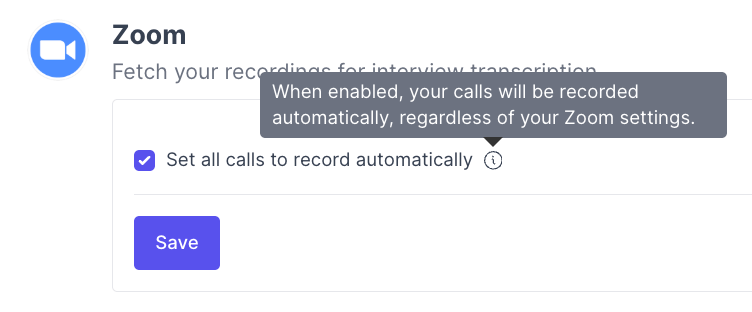
 6. Configure recording — enable or disable **Set all calls to record automatically** (enabled by default).
 ## Recording behavior and requirements
* When **Set all calls to record automatically** is enabled, recording begins at the start of each interview, regardless of your Zoom account's default settings.
* Recordings must be saved to the **Zoom cloud** for this integration to pull them in, that's a Zoom API limitation, not a Great Question restriction. Local recordings can't be retrieved automatically.
* To make sure shared screens are included in recordings:
1. Go to your Zoom recording settings.
2. Open the **Recording** tab.
3. Uncheck **Record active speaker, gallery view and shared screen separately**.
If recordings are saved locally rather than to the Zoom cloud, they will not appear in the interview room. (If you use Zoom for Observer Rooms livestreaming, that feature has its own, unrelated local-recording requirement,see the [Observer Rooms](/support/support/modular-study-add-ons/observer-rooms) guide.)
## Troubleshooting
| Issue | What's happening | How to fix it |
| ------------------------------------- | ---------------------------------------- | ---------------------------------------------------------------- |
| Zoom link not added to interview | Integration not connected | Confirm Zoom is connected under **Settings → Integrations** |
| Recording missing from interview room | Recording saved locally or never started | Ensure cloud recording is enabled and auto-record is turned on |
| Screen share not included | Zoom recording settings split the views | Update your Zoom recording settings to include the shared screen |
***
**Still need help?** Contact us at [support@greatquestion.co](mailto:support@greatquestion.co) — median response time is 19 minutes during [support hours](https://greatquestion.co/features/about-our-support-team).
## Recording behavior and requirements
* When **Set all calls to record automatically** is enabled, recording begins at the start of each interview, regardless of your Zoom account's default settings.
* Recordings must be saved to the **Zoom cloud** for this integration to pull them in, that's a Zoom API limitation, not a Great Question restriction. Local recordings can't be retrieved automatically.
* To make sure shared screens are included in recordings:
1. Go to your Zoom recording settings.
2. Open the **Recording** tab.
3. Uncheck **Record active speaker, gallery view and shared screen separately**.
If recordings are saved locally rather than to the Zoom cloud, they will not appear in the interview room. (If you use Zoom for Observer Rooms livestreaming, that feature has its own, unrelated local-recording requirement,see the [Observer Rooms](/support/support/modular-study-add-ons/observer-rooms) guide.)
## Troubleshooting
| Issue | What's happening | How to fix it |
| ------------------------------------- | ---------------------------------------- | ---------------------------------------------------------------- |
| Zoom link not added to interview | Integration not connected | Confirm Zoom is connected under **Settings → Integrations** |
| Recording missing from interview room | Recording saved locally or never started | Ensure cloud recording is enabled and auto-record is turned on |
| Screen share not included | Zoom recording settings split the views | Update your Zoom recording settings to include the shared screen |
***
**Still need help?** Contact us at [support@greatquestion.co](mailto:support@greatquestion.co) — median response time is 19 minutes during [support hours](https://greatquestion.co/features/about-our-support-team).