> ## Documentation Index
> Fetch the complete documentation index at: https://greatquestion.co/support/llms.txt
> Use this file to discover all available pages before exploring further.
# Screeners
> Qualify or disqualify participants with a short questionnaire before they join your study.
Screeners are short questionnaires that qualify or disqualify participants before they join a study, so you only spend time with the right people. Based on how candidates answer, they're qualified, disqualified, or routed to follow-up questions using conditional logic, automatically or after your review.
## Why use a screener
* **Target the right participants.** Filter out candidates who don't meet your criteria.
* **Save time on qualification.** Auto-qualification and auto-disqualification remove manual review.
* **Keep standards consistent.** Every candidate is evaluated against the same criteria.
* **Route dynamically.** Conditional branches guide candidates to different questions based on their answers.
## Enabling a screener
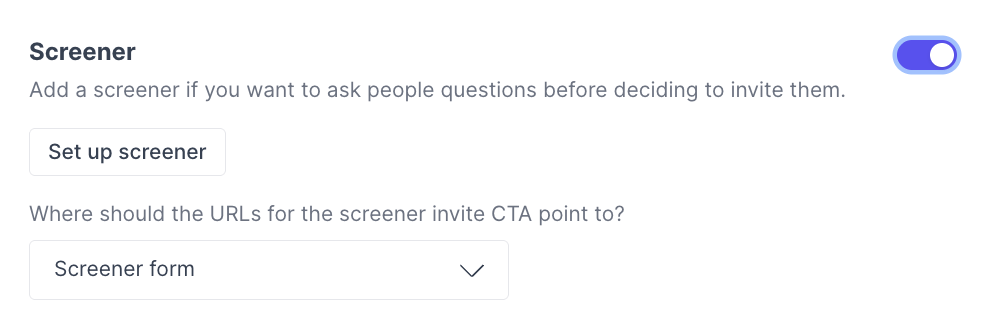
1. Enable the **Screener** under **Plan** in your study.
 2. Add questions using the question builder.
3. Configure qualifying logic, disqualifying logic, or conditional branches in the **Question Logic** panel.
2. Add questions using the question builder.
3. Configure qualifying logic, disqualifying logic, or conditional branches in the **Question Logic** panel.
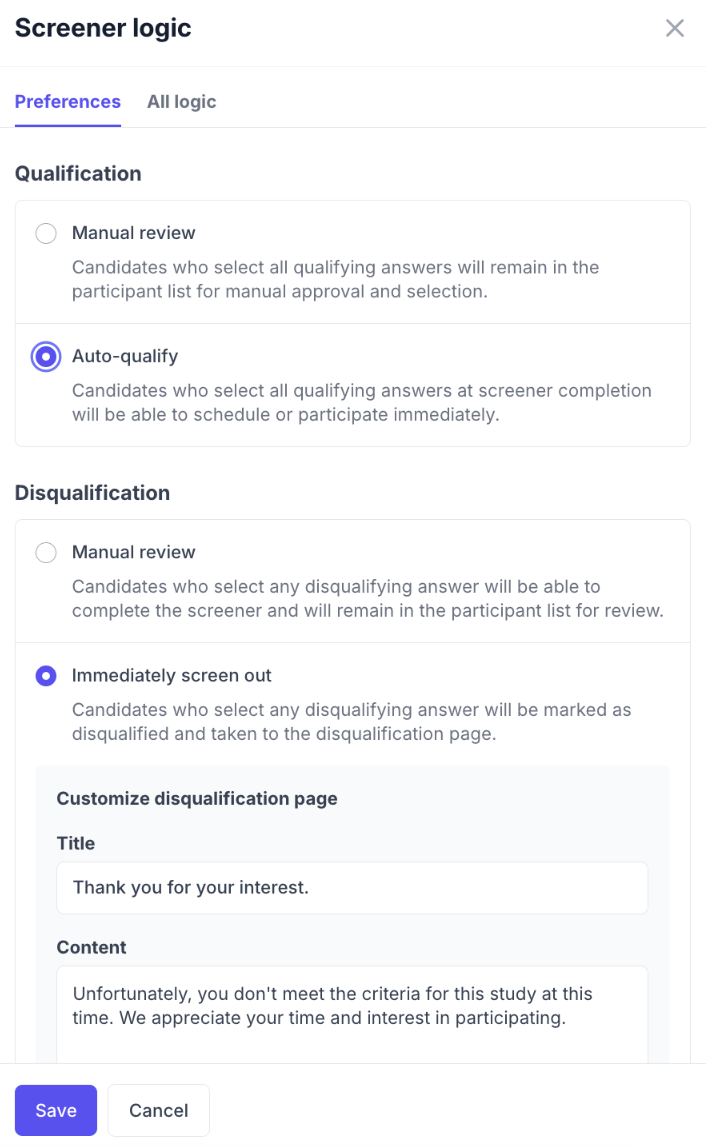
 4. Open **Screener Logic** in the header to configure review settings.
 5. Use **Preview** to test the screener flow before publishing.
6. Save your screener.
## Question types
Screeners support Short Text, Long Text, Single Select, Multi Select, Yes/No, Number, Linear Scale, Email, Website, Date, Location, Matrix, and Info blocks.
| **Type** | **Description** |
| :-------------- | :-------------------------------------------------- |
| Short Text | Single-line text response |
| Long Text | Multi-line text response |
| Single Select | Choose one option from a list (radio buttons) |
| Multi Select | Choose one or more options from a list (checkboxes) |
| Yes / No | Simple yes or no question |
| Number | Numeric input |
| Linear Scale | Numeric scale with custom min/max labels |
| Email | Email address input |
| Website | URL input |
| Date | Date picker |
| Location | Location input |
| Matrix | Grid/table-style question with rows and columns |
| Info | Informational text block (no response collected) |
## Qualifying and disqualifying answers
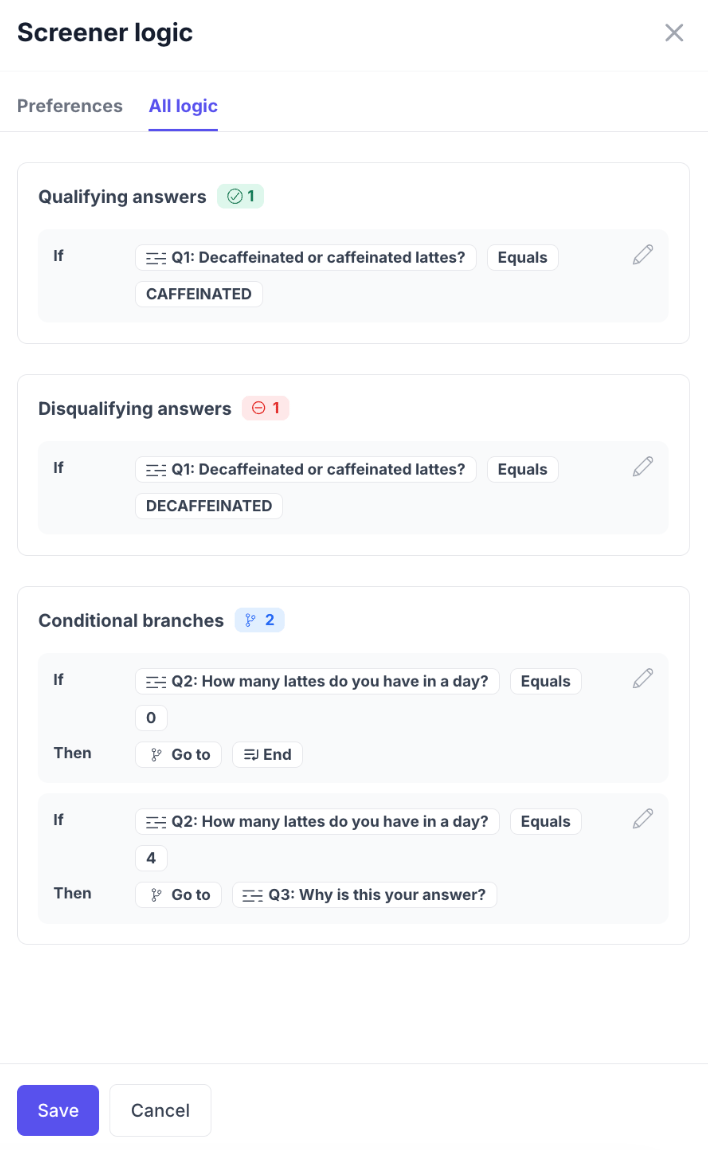
**Qualifying answers** mark the responses that match your ideal participant. The conditions available depend on the question type, exact match, contains, greater than, and so on.
| Question Type | Available Conditions |
| :--------------------------------------------- | :------------------------------------------------------------------------- |
| Choice questions (Single Select, Multi Select) | Is exact match, Is not, Contains all of, Contains any of, Contains none of |
| Text questions (Short Text, Long Text) | Contains, Doesn't contain, Starts with, Ends with, Equals, Doesn't equal |
| Number questions | Equals, Greater than, Less than, Within (range) |
| Yes / No questions | Is, Isn't |
| Date questions | After, Before, Between |
**Disqualifying answers** mark responses that screen a candidate out. If a candidate selects one, they're flagged as disqualified. You can also choose **not** to store a disqualified candidate's response data at all, if disqualification review is set to screen people out immediately.
Use qualifying and disqualifying answers together to describe both who you want and who you don't.
## Conditional branches (skip logic)
Conditional branches route candidates to different questions based on their answers. They work on every question type except **Matrix** (not supported) and **Info** (not applicable). A branch can send a candidate to a specific later question or end the screener early.
5. Use **Preview** to test the screener flow before publishing.
6. Save your screener.
## Question types
Screeners support Short Text, Long Text, Single Select, Multi Select, Yes/No, Number, Linear Scale, Email, Website, Date, Location, Matrix, and Info blocks.
| **Type** | **Description** |
| :-------------- | :-------------------------------------------------- |
| Short Text | Single-line text response |
| Long Text | Multi-line text response |
| Single Select | Choose one option from a list (radio buttons) |
| Multi Select | Choose one or more options from a list (checkboxes) |
| Yes / No | Simple yes or no question |
| Number | Numeric input |
| Linear Scale | Numeric scale with custom min/max labels |
| Email | Email address input |
| Website | URL input |
| Date | Date picker |
| Location | Location input |
| Matrix | Grid/table-style question with rows and columns |
| Info | Informational text block (no response collected) |
## Qualifying and disqualifying answers
**Qualifying answers** mark the responses that match your ideal participant. The conditions available depend on the question type, exact match, contains, greater than, and so on.
| Question Type | Available Conditions |
| :--------------------------------------------- | :------------------------------------------------------------------------- |
| Choice questions (Single Select, Multi Select) | Is exact match, Is not, Contains all of, Contains any of, Contains none of |
| Text questions (Short Text, Long Text) | Contains, Doesn't contain, Starts with, Ends with, Equals, Doesn't equal |
| Number questions | Equals, Greater than, Less than, Within (range) |
| Yes / No questions | Is, Isn't |
| Date questions | After, Before, Between |
**Disqualifying answers** mark responses that screen a candidate out. If a candidate selects one, they're flagged as disqualified. You can also choose **not** to store a disqualified candidate's response data at all, if disqualification review is set to screen people out immediately.
Use qualifying and disqualifying answers together to describe both who you want and who you don't.
## Conditional branches (skip logic)
Conditional branches route candidates to different questions based on their answers. They work on every question type except **Matrix** (not supported) and **Info** (not applicable). A branch can send a candidate to a specific later question or end the screener early.
 If you're using External Recruitment with a Single Select, Multi Select, or Yes/No question, skip logic on that question is more restricted, see the External Recruitment requirements below.
Changing a question's type after adding skip logic can clear that logic. Double-check your branches if you change a question's type partway through building a screener.
## Review settings
**Qualification review** controls what happens to candidates who match your qualifying answers:
* **Manual review** (default): matching candidates wait for your approval.
* **Automatic review**: qualified candidates schedule or participate immediately.
**Disqualification review** controls what happens to candidates who don't qualify:
* **Manual review** (default): disqualified candidates complete the full screener and stay in the participant list for your review.
* **Immediately screen out**: disqualified candidates are marked disqualified and see a disqualification page.
## Qualification statuses
| Status | Meaning |
| ---------------- | ---------------------------------------------------------------------------- |
| **Qualified** | Selected all qualifying answers and none disqualifying |
| **Disqualified** | Selected at least one disqualifying answer |
| **Partial** | Selected qualifying answers but didn't match all criteria |
| **No Data** | The screener had no qualifying criteria, or the candidate didn't complete it |
## Reviewing all logic at a glance
To see every qualifying answer, disqualifying answer, and conditional branch in one place, click the settings icon in the screener builder and open the **All Logic** tab.
## Updating the screener headline
Go to **Setup**, click **Pages**, select the landing page, click **Edit**, and update the **Headline** field.
## Publishing requirements
* At least one question.
* If automatic review is enabled, at least one question must have qualifying answers.
* [External Recruitment](/support/support/add-ons/external-recruitment) has its own screener requirements, and they differ by provider: if your account recruits through Respondent, you need at least two questions with qualifying answers configured; if your account recruits through User Interviews, one question is enough, with no hard qualifying-answer requirement unless automatic review is on.
## Best practices
* Preview the full flow before launching.
* Keep screeners short to improve completion rates.
* Use qualifying and disqualifying answers together.
* Use conditional branches to skip irrelevant questions.
* Customize the disqualification page for a positive candidate experience.
* Consider automatic review for high-volume studies.
## Troubleshooting
| **Issue** | **What's Happening** | **How to Fix It** |
| :--------------------------------------------------------- | :----------------------------------------------------------------------------------------- | :----------------------------------------------------------------------------------------------------------------------------------------------------------------------------------------------------------------------------------------------------------------- |
| Screener questions aren't showing in preview | The screener wasn't saved or published after editing. | Go back to the Screener setup, click **Save**, and ensure your study status is **Published**. |
| Participants aren't being auto-qualified/disqualified | Logic rules or answer tags weren't set correctly. | Open each question's **Question Logic** panel and confirm that qualifying/disqualifying answers are selected. If automatic review is enabled, confirm at least one question has qualifying answers specified. |
| Conditional branches not working as expected | Branching logic was applied to an unsupported question type or a response path is missing. | Conditional branches are only supported on **Single Select**, **Multi Select**, and **Yes/No** questions. Review the **All Logic** tab to verify each rule leads to a valid next question. |
| Disqualified candidates still appear in the "Applied" tab | Manual review mode is active instead of "Immediately screen out." | Go to the **Preferences** tab under Screener Logic and enable **Immediately screen out** for disqualifying answers. |
| Qualification tags (Qualified / Partial / No data) missing | Candidate didn't complete all questions or logic didn't include any qualifying rules. | Check that at least one question has a **Qualifying** answer and test with a complete response. |
| Screener data not showing in Participant table | Responses were not stored due to privacy settings. | Disable **Don't Store Participant Responses** in Screener settings if you want to retain disqualified candidate data. If a conditional branch is set to **The final step (without collecting the response)**, data for those candidates will also not be retained. |
## FAQ
| Question | Answer |
| :--------------------------------------------- | :-------------------------------------------------------------------------------------------------------------------------------------------------------------------------------------------------------------------------------------------------- |
| What happened to "Ideal Answers"? | Ideal Answers have been replaced with qualification rules at the question level. You now tag answers as **Qualifying** directly within each question's logic settings using conditions like "Is exact match," "Contains any of," or "Greater than." |
| Do I need to update existing screeners? | No. All legacy screeners have been migrated automatically and will continue to function as before. |
| Are there minimum requirements for a screener? | Yes. You need at least one question for standard studies, or at least two if using external recruitment. If automatic review or external recruitment is enabled, at least one question must include qualifying answers. |
***
**Still need help?** Contact us at [support@greatquestion.co](mailto:support@greatquestion.co) — median response time is 19 minutes during [support hours](https://greatquestion.co/features/about-our-support-team).
If you're using External Recruitment with a Single Select, Multi Select, or Yes/No question, skip logic on that question is more restricted, see the External Recruitment requirements below.
Changing a question's type after adding skip logic can clear that logic. Double-check your branches if you change a question's type partway through building a screener.
## Review settings
**Qualification review** controls what happens to candidates who match your qualifying answers:
* **Manual review** (default): matching candidates wait for your approval.
* **Automatic review**: qualified candidates schedule or participate immediately.
**Disqualification review** controls what happens to candidates who don't qualify:
* **Manual review** (default): disqualified candidates complete the full screener and stay in the participant list for your review.
* **Immediately screen out**: disqualified candidates are marked disqualified and see a disqualification page.
## Qualification statuses
| Status | Meaning |
| ---------------- | ---------------------------------------------------------------------------- |
| **Qualified** | Selected all qualifying answers and none disqualifying |
| **Disqualified** | Selected at least one disqualifying answer |
| **Partial** | Selected qualifying answers but didn't match all criteria |
| **No Data** | The screener had no qualifying criteria, or the candidate didn't complete it |
## Reviewing all logic at a glance
To see every qualifying answer, disqualifying answer, and conditional branch in one place, click the settings icon in the screener builder and open the **All Logic** tab.
## Updating the screener headline
Go to **Setup**, click **Pages**, select the landing page, click **Edit**, and update the **Headline** field.
## Publishing requirements
* At least one question.
* If automatic review is enabled, at least one question must have qualifying answers.
* [External Recruitment](/support/support/add-ons/external-recruitment) has its own screener requirements, and they differ by provider: if your account recruits through Respondent, you need at least two questions with qualifying answers configured; if your account recruits through User Interviews, one question is enough, with no hard qualifying-answer requirement unless automatic review is on.
## Best practices
* Preview the full flow before launching.
* Keep screeners short to improve completion rates.
* Use qualifying and disqualifying answers together.
* Use conditional branches to skip irrelevant questions.
* Customize the disqualification page for a positive candidate experience.
* Consider automatic review for high-volume studies.
## Troubleshooting
| **Issue** | **What's Happening** | **How to Fix It** |
| :--------------------------------------------------------- | :----------------------------------------------------------------------------------------- | :----------------------------------------------------------------------------------------------------------------------------------------------------------------------------------------------------------------------------------------------------------------- |
| Screener questions aren't showing in preview | The screener wasn't saved or published after editing. | Go back to the Screener setup, click **Save**, and ensure your study status is **Published**. |
| Participants aren't being auto-qualified/disqualified | Logic rules or answer tags weren't set correctly. | Open each question's **Question Logic** panel and confirm that qualifying/disqualifying answers are selected. If automatic review is enabled, confirm at least one question has qualifying answers specified. |
| Conditional branches not working as expected | Branching logic was applied to an unsupported question type or a response path is missing. | Conditional branches are only supported on **Single Select**, **Multi Select**, and **Yes/No** questions. Review the **All Logic** tab to verify each rule leads to a valid next question. |
| Disqualified candidates still appear in the "Applied" tab | Manual review mode is active instead of "Immediately screen out." | Go to the **Preferences** tab under Screener Logic and enable **Immediately screen out** for disqualifying answers. |
| Qualification tags (Qualified / Partial / No data) missing | Candidate didn't complete all questions or logic didn't include any qualifying rules. | Check that at least one question has a **Qualifying** answer and test with a complete response. |
| Screener data not showing in Participant table | Responses were not stored due to privacy settings. | Disable **Don't Store Participant Responses** in Screener settings if you want to retain disqualified candidate data. If a conditional branch is set to **The final step (without collecting the response)**, data for those candidates will also not be retained. |
## FAQ
| Question | Answer |
| :--------------------------------------------- | :-------------------------------------------------------------------------------------------------------------------------------------------------------------------------------------------------------------------------------------------------- |
| What happened to "Ideal Answers"? | Ideal Answers have been replaced with qualification rules at the question level. You now tag answers as **Qualifying** directly within each question's logic settings using conditions like "Is exact match," "Contains any of," or "Greater than." |
| Do I need to update existing screeners? | No. All legacy screeners have been migrated automatically and will continue to function as before. |
| Are there minimum requirements for a screener? | Yes. You need at least one question for standard studies, or at least two if using external recruitment. If automatic review or external recruitment is enabled, at least one question must include qualifying answers. |
***
**Still need help?** Contact us at [support@greatquestion.co](mailto:support@greatquestion.co) — median response time is 19 minutes during [support hours](https://greatquestion.co/features/about-our-support-team).