> ## Documentation Index
> Fetch the complete documentation index at: https://greatquestion.co/support/llms.txt
> Use this file to discover all available pages before exploring further.
# Ask AI
> Search across every interview and unmoderated test in your repository, with evidence-backed answers and verbatim quotes.
Ask AI is an AI-powered research assistant built into your Great Question repository. Instead of manually searching through studies one at a time, you ask a natural-language question and get structured, citation-backed answers drawn from your transcripts. It searches broadly first, then helps you zoom in on the patterns, quotes, and themes that matter.
Ask AI works at two levels: you can query across your entire repository for cross-study synthesis, or scope it to a single study or session for deeper analysis, including its highlights.
## Why it matters
Ask AI surfaces insights you didn't know existed, it searches all of your studies automatically, so you don't need to know which study to check. Every claim is tied to a verbatim participant quote with a link to the source session, so you can hover to preview and click to jump to that moment in the recording. You can synthesize across studies in seconds, asking big-picture questions and getting structured themes with supporting quotes spanning multiple studies and time periods. And because product managers, designers, and executives can self-serve simple questions, research stays accessible to your whole team.
## Who is it for?
| Role | Example question | How it helps |
| ---------------- | ----------------------------------------------------- | ------------------------------------------------------------------------ |
| Designers | "What do users say about navigation?" | Surface patterns across studies and back design decisions with evidence. |
| Product managers | "Has feedback on Feature X changed since the update?" | Compare feedback across quarters and get quotes for sprint planning. |
| Researchers | "What did customers say about pricing?" | Let stakeholders self-serve while you focus on strategic work. |
| Executives | "What evidence supports this product direction?" | Quick answers with proof for stakeholder presentations. |
## How to access Ask AI
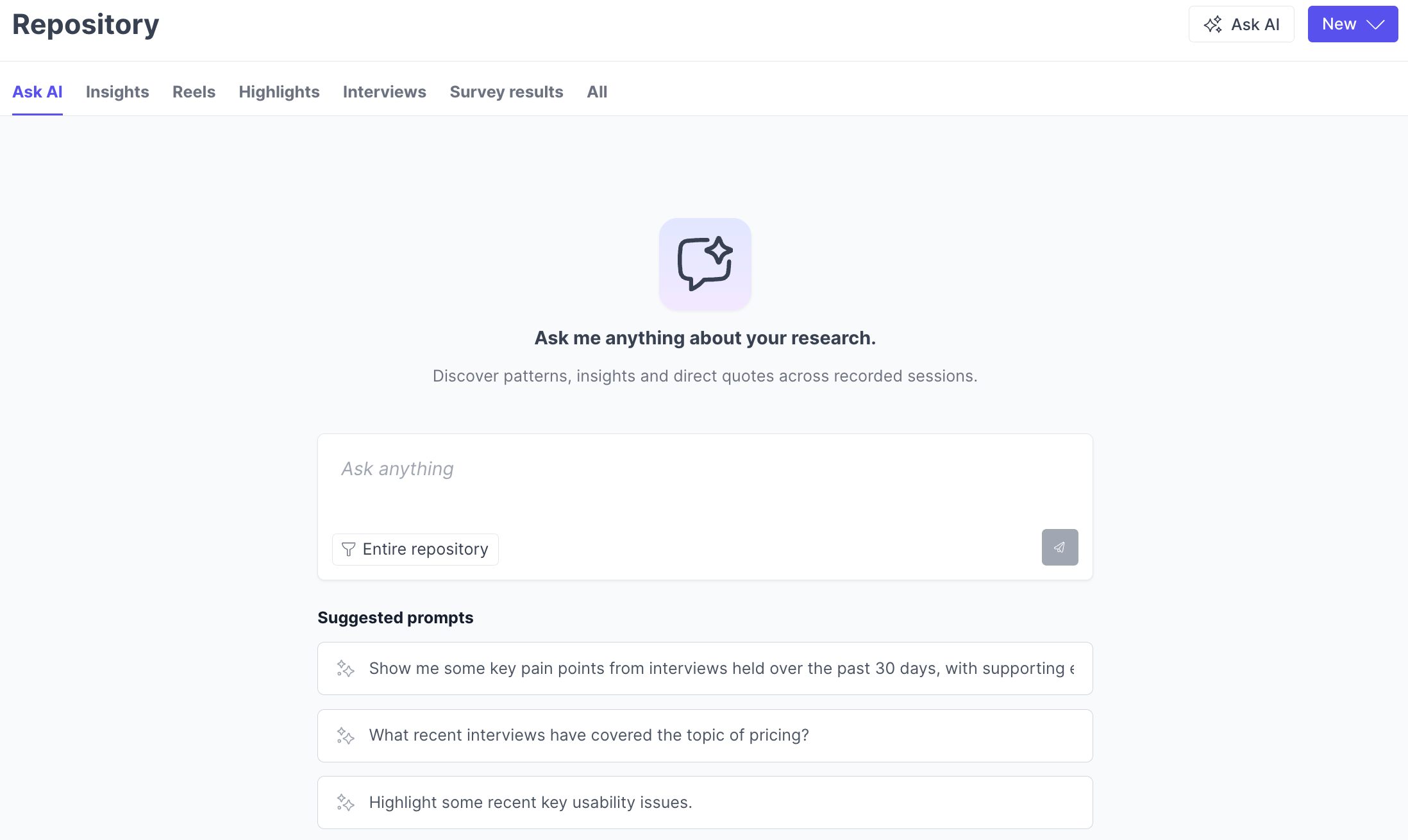
1. Navigate to the **Repository** and open the **Ask AI** tab in the header.
2. Check the scope of your query. By default, Ask AI searches the entire repository, use the **source filter** to narrow to specific teams, studies, or sessions.
3. Type a focused question (for example, "What onboarding issues did users mention?").
4. Review the response, including linked quotes and study context.
Ask AI searches broadly by default, then groups results by theme and timeframe. You can ask follow-up questions to narrow results further, by date range or company, for example.
You can multi-select teams, studies, or sessions to focus your query on exactly the interviews you want the AI to consider.
 ## What kinds of questions can I ask?
| Query type | Example | What you get |
| --------------------- | ------------------------------------------------------------------- | ------------------------------------------------------- |
| Topic-based | "What feedback have users given about dashboard navigation?" | A thematic summary with quotes and temporal patterns |
| Time-based | "What usability issues came up in the last 6 months?" | Date-filtered results with temporal coverage |
| Comparative | "How has sentiment about our onboarding changed over time?" | A side-by-side evolution across time periods |
| Prevalence | "How commonly do users mention the export feature as a pain point?" | Exact counts and which studies or sessions mentioned it |
| Participant filtering | "What did enterprise customers say about pricing?" | Results scoped to matching participants |
| Trend spotting | "What new themes are emerging in recent customer interviews?" | Temporal patterns with supporting evidence |
## How Ask AI works
Ask AI is an agentic system that thinks strategically, not just a keyword search tool. When you ask a question, it develops a search strategy, chooses the right approach, and executes multiple searches from different angles to find the best answer, up to a handful of search rounds per question.
It's **discovery-first**: rather than demanding filters upfront, it searches broadly and shows you what exists, revealing temporal patterns, coverage gaps, and refinement options based on what it finds. It uses **semantic understanding** to match intent, not just keywords, ask about "checkout problems" and it finds mentions of "payment failed," "couldn't complete order," and "card was declined." And it performs **cross-study synthesis**, identifying patterns across studies and time periods and reporting prevalence counts (for example, "8 of 12 participants mentioned this") so you can gauge how widespread a theme is.
At the repository level, Ask AI searches transcripts and study summaries. When you're chatting from inside a specific study or session, it also has access to that study's highlights.
## Key features
**Citations linked to recordings.** Every answer includes verbatim quotes with full source attribution, session ID, study name, date, and participant context. Click any quote block to jump directly to that moment in the recording.
## What kinds of questions can I ask?
| Query type | Example | What you get |
| --------------------- | ------------------------------------------------------------------- | ------------------------------------------------------- |
| Topic-based | "What feedback have users given about dashboard navigation?" | A thematic summary with quotes and temporal patterns |
| Time-based | "What usability issues came up in the last 6 months?" | Date-filtered results with temporal coverage |
| Comparative | "How has sentiment about our onboarding changed over time?" | A side-by-side evolution across time periods |
| Prevalence | "How commonly do users mention the export feature as a pain point?" | Exact counts and which studies or sessions mentioned it |
| Participant filtering | "What did enterprise customers say about pricing?" | Results scoped to matching participants |
| Trend spotting | "What new themes are emerging in recent customer interviews?" | Temporal patterns with supporting evidence |
## How Ask AI works
Ask AI is an agentic system that thinks strategically, not just a keyword search tool. When you ask a question, it develops a search strategy, chooses the right approach, and executes multiple searches from different angles to find the best answer, up to a handful of search rounds per question.
It's **discovery-first**: rather than demanding filters upfront, it searches broadly and shows you what exists, revealing temporal patterns, coverage gaps, and refinement options based on what it finds. It uses **semantic understanding** to match intent, not just keywords, ask about "checkout problems" and it finds mentions of "payment failed," "couldn't complete order," and "card was declined." And it performs **cross-study synthesis**, identifying patterns across studies and time periods and reporting prevalence counts (for example, "8 of 12 participants mentioned this") so you can gauge how widespread a theme is.
At the repository level, Ask AI searches transcripts and study summaries. When you're chatting from inside a specific study or session, it also has access to that study's highlights.
## Key features
**Citations linked to recordings.** Every answer includes verbatim quotes with full source attribution, session ID, study name, date, and participant context. Click any quote block to jump directly to that moment in the recording.
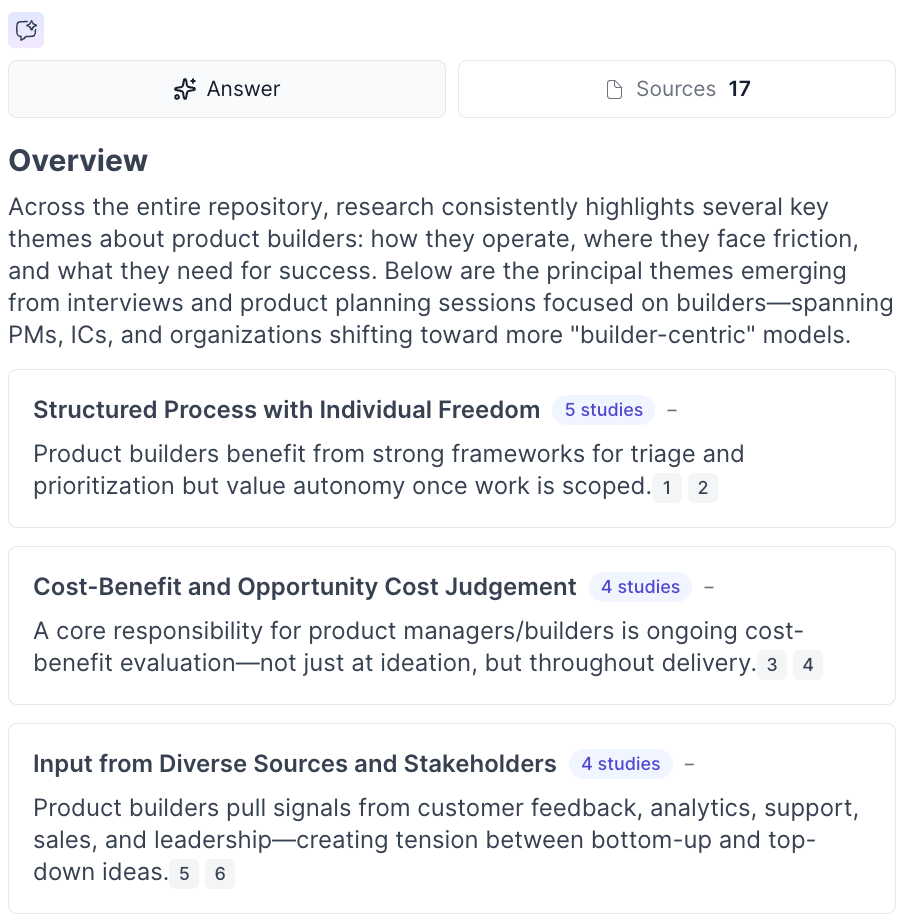 **Collapsible sidebar and full-page mode.** Expand or collapse the AI Chat sidebar, or switch to a full-page view at any time. Your conversation persists as you navigate between sessions.
**Chat sharing.** Share AI Chat conversations with teammates via a link to collaborate on the insights you discover.
**Automatic speaker role detection.** Ask AI identifies who is a participant and who is a moderator, leading to more accurate insights and fewer irrelevant quotes.
**Study-level synthesis.** On moderated interview studies with three or more sessions with transcripts, you'll automatically see AI-generated summaries, key insights, and structured themes — and you can use an embedded Ask AI chat scoped to that study for deeper exploration.
## Best practices
Start specific, then broaden, ask topic-based questions first rather than "summarize everything," and you'll get tighter results. Use follow-ups to refine, since Ask AI maintains context across the conversation. Always review the linked quotes to validate a finding before sharing it. Scope your search with the source filter when you know where to look, and use the full repository scope when you're exploring. If results feel off, check transcript quality, Ask AI is only as good as the transcripts it searches.
## Trust and security
| Guarantee | Description |
| ---------------------------- | ------------------------------------------------------------------------------------------------------------------------------------------------- |
| Evidence-based only | Every claim is backed by verbatim quotes from your actual research. If the evidence isn't there, Ask AI tells you instead of inventing something. |
| PII protection | Speaker identification uses handles only. Real names never surface in AI responses. |
| Relevance verified | Ask AI validates that retrieved content actually answers your question before including it. |
| Confirmation bias prevention | Ask something vague and Ask AI asks clarifying questions first. |
| Role-based permissions | Granular visibility controls and data retention policies keep research accessible to the right people. |
## Repository-level vs. study-level Ask AI
**Ask AI (repository-level)** searches across all interviews in scope to surface patterns and quotes spanning multiple studies. Use it when you're synthesizing, exploring, or don't know which study has the answer.
**Ask AI in a study or session** answers questions within a single study or session, and additionally has access to that scope's highlights. Use it when you're deep in one interview and want to find specific moments or themes within that context.
## Troubleshooting
| Issue | What's happening | How to fix it |
| --------------------------------------------------- | ----------------------------------------------------------------------------------------------------------------------------------------------------------------------------------------- | ------------------------------------------------------------------------------------------------------------------------------------------------------ |
| Ask AI returns no results or says "not found" | The transcripts in scope may not cover your question, or you don't have access to sessions that do. | Broaden your scope by removing source filters, rephrase with different terms, and confirm the expected studies have completed transcripts. |
| A study or session doesn't show up in Ask AI at all | Ask AI only searches sessions with a completed transcript — recordings and unmoderated tests without narration (like a pure card sort or tree test) don't have anything for it to search. | Confirm the session has a completed transcript. Sessions without spoken content won't be searchable through Ask AI. |
| Results seem inaccurate or low quality | Transcript quality directly affects response quality. | Review the source transcripts behind the cited quotes for errors, and consider re-uploading higher-quality recordings or editing transcripts manually. |
| Not returning results from a specific study | You may lack permission, or the study has no transcribed sessions. | Confirm you can open the study directly, that it has at least one completed transcript, and that it belongs to a team you're a member of. |
| Responses feel incomplete | Your question may be too broad, or coverage on the topic is limited. | Ask a more specific, topic-focused question, and use follow-ups to narrow by timeframe, segment, or theme. |
| Citations link to irrelevant sessions | Semantic search matches on meaning, so it occasionally surfaces related-but-off-point content. | Review the linked quotes, and refine your question or scope it to particular teams or studies. |
| Ask AI tab not visible | The feature may not be enabled for your account, or your plan may not include it. | Contact your account administrator, or reach out to [support@greatquestion.co](mailto:support@greatquestion.co). |
| A conversation says the context is too large | A study or session in scope has too much transcript content for one conversation. | Start a new chat, or narrow the scope to fewer sessions. |
| Responses take a long time | Ask AI searches the entire repository by default; very large accounts may be slower. | Narrow your scope with the source filter and ask more targeted questions. |
| Moderator quotes appearing in results | Speaker role detection occasionally misassigns speakers. | Review the source session and edit the transcript's speaker labels to improve future results. |
## Frequently asked questions
**How does Ask AI prevent hallucinations?** Every answer is grounded in your actual research data, with each claim tied to a specific verbatim quote from a specific session. If the evidence isn't in your repository, Ask AI tells you "not found" rather than making something up.
**Can my whole team use Ask AI?** Yes. It's designed for researchers, product managers, designers, and executives alike, and granular role-based permissions let you control exactly who has access to which data and features.
**How is participant privacy protected?** Speaker identification uses handles only, so real names never surface in AI responses.
**Does Ask AI work with all research methods?** It works across studies that have transcribed sessions, interviews, unmoderated tests, and standalone recordings. Research methods without spoken content, like a pure card sort or tree test with no narration, don't have a transcript for it to search.
**What sessions can I access?** Ask AI respects all existing team permissions and study visibility settings; you can only search studies and sessions you already have permission to view. Your chat history is private to you — teammates don't see the list of conversations you've had. Individual chats become viewable only when you share their link with someone on your account.
***
**Still need help?** Contact us at [support@greatquestion.co](mailto:support@greatquestion.co) — median response time is 19 minutes during [support hours](https://greatquestion.co/features/about-our-support-team).
**Collapsible sidebar and full-page mode.** Expand or collapse the AI Chat sidebar, or switch to a full-page view at any time. Your conversation persists as you navigate between sessions.
**Chat sharing.** Share AI Chat conversations with teammates via a link to collaborate on the insights you discover.
**Automatic speaker role detection.** Ask AI identifies who is a participant and who is a moderator, leading to more accurate insights and fewer irrelevant quotes.
**Study-level synthesis.** On moderated interview studies with three or more sessions with transcripts, you'll automatically see AI-generated summaries, key insights, and structured themes — and you can use an embedded Ask AI chat scoped to that study for deeper exploration.
## Best practices
Start specific, then broaden, ask topic-based questions first rather than "summarize everything," and you'll get tighter results. Use follow-ups to refine, since Ask AI maintains context across the conversation. Always review the linked quotes to validate a finding before sharing it. Scope your search with the source filter when you know where to look, and use the full repository scope when you're exploring. If results feel off, check transcript quality, Ask AI is only as good as the transcripts it searches.
## Trust and security
| Guarantee | Description |
| ---------------------------- | ------------------------------------------------------------------------------------------------------------------------------------------------- |
| Evidence-based only | Every claim is backed by verbatim quotes from your actual research. If the evidence isn't there, Ask AI tells you instead of inventing something. |
| PII protection | Speaker identification uses handles only. Real names never surface in AI responses. |
| Relevance verified | Ask AI validates that retrieved content actually answers your question before including it. |
| Confirmation bias prevention | Ask something vague and Ask AI asks clarifying questions first. |
| Role-based permissions | Granular visibility controls and data retention policies keep research accessible to the right people. |
## Repository-level vs. study-level Ask AI
**Ask AI (repository-level)** searches across all interviews in scope to surface patterns and quotes spanning multiple studies. Use it when you're synthesizing, exploring, or don't know which study has the answer.
**Ask AI in a study or session** answers questions within a single study or session, and additionally has access to that scope's highlights. Use it when you're deep in one interview and want to find specific moments or themes within that context.
## Troubleshooting
| Issue | What's happening | How to fix it |
| --------------------------------------------------- | ----------------------------------------------------------------------------------------------------------------------------------------------------------------------------------------- | ------------------------------------------------------------------------------------------------------------------------------------------------------ |
| Ask AI returns no results or says "not found" | The transcripts in scope may not cover your question, or you don't have access to sessions that do. | Broaden your scope by removing source filters, rephrase with different terms, and confirm the expected studies have completed transcripts. |
| A study or session doesn't show up in Ask AI at all | Ask AI only searches sessions with a completed transcript — recordings and unmoderated tests without narration (like a pure card sort or tree test) don't have anything for it to search. | Confirm the session has a completed transcript. Sessions without spoken content won't be searchable through Ask AI. |
| Results seem inaccurate or low quality | Transcript quality directly affects response quality. | Review the source transcripts behind the cited quotes for errors, and consider re-uploading higher-quality recordings or editing transcripts manually. |
| Not returning results from a specific study | You may lack permission, or the study has no transcribed sessions. | Confirm you can open the study directly, that it has at least one completed transcript, and that it belongs to a team you're a member of. |
| Responses feel incomplete | Your question may be too broad, or coverage on the topic is limited. | Ask a more specific, topic-focused question, and use follow-ups to narrow by timeframe, segment, or theme. |
| Citations link to irrelevant sessions | Semantic search matches on meaning, so it occasionally surfaces related-but-off-point content. | Review the linked quotes, and refine your question or scope it to particular teams or studies. |
| Ask AI tab not visible | The feature may not be enabled for your account, or your plan may not include it. | Contact your account administrator, or reach out to [support@greatquestion.co](mailto:support@greatquestion.co). |
| A conversation says the context is too large | A study or session in scope has too much transcript content for one conversation. | Start a new chat, or narrow the scope to fewer sessions. |
| Responses take a long time | Ask AI searches the entire repository by default; very large accounts may be slower. | Narrow your scope with the source filter and ask more targeted questions. |
| Moderator quotes appearing in results | Speaker role detection occasionally misassigns speakers. | Review the source session and edit the transcript's speaker labels to improve future results. |
## Frequently asked questions
**How does Ask AI prevent hallucinations?** Every answer is grounded in your actual research data, with each claim tied to a specific verbatim quote from a specific session. If the evidence isn't in your repository, Ask AI tells you "not found" rather than making something up.
**Can my whole team use Ask AI?** Yes. It's designed for researchers, product managers, designers, and executives alike, and granular role-based permissions let you control exactly who has access to which data and features.
**How is participant privacy protected?** Speaker identification uses handles only, so real names never surface in AI responses.
**Does Ask AI work with all research methods?** It works across studies that have transcribed sessions, interviews, unmoderated tests, and standalone recordings. Research methods without spoken content, like a pure card sort or tree test with no narration, don't have a transcript for it to search.
**What sessions can I access?** Ask AI respects all existing team permissions and study visibility settings; you can only search studies and sessions you already have permission to view. Your chat history is private to you — teammates don't see the list of conversations you've had. Individual chats become viewable only when you share their link with someone on your account.
***
**Still need help?** Contact us at [support@greatquestion.co](mailto:support@greatquestion.co) — median response time is 19 minutes during [support hours](https://greatquestion.co/features/about-our-support-team).