> ## Documentation Index
> Fetch the complete documentation index at: https://greatquestion.co/support/llms.txt
> Use this file to discover all available pages before exploring further.
# Using AI in Great Question
> An overview of how Great Question uses AI, why it matters, and how to turn it on for your account.
Great Question AI helps you synthesize research, query studies, generate summaries, and streamline repetitive tasks. Instead of manually combing through interviews and transcripts, you can ask questions in plain language and receive direct, context-based responses.
AI across the product powers a few distinct features:
* [**Ask AI**](/support/support/repository/ask-ai) — a conversational assistant that searches your repository and answers questions with cited quotes.
* [**AI Synthesis**](/support/support/repository/synthesis) — automatic summaries, themes, and highlight reels once a study has enough transcribed interviews.
* **Interview chapters and summaries** — auto-generated chaptering and a concise AI overview for each transcribed session.
* **Auto-highlighting and suggested tags** — AI suggests important moments and relevant tags as transcripts process.
* **Suggested titles** — AI-generated titles you can accept or edit, for studies and highlights.
* [**AI-moderated interviews**](/support/support/studies/ai-moderated-interviews) — a separate, account-gated feature where an AI moderator runs the interview itself.
This article covers the account-wide setting that turns AI on, the individual feature toggles, and how your data is handled. For how to actually use Ask AI or Synthesis day to day, see their dedicated articles above.
## Why it matters
AI reduces the time it takes to analyze and share research. It speeds up synthesis by automatically generating summaries, titles, and tags; improves discoverability through auto-tagging and suggested titles; and lets teams analyze more data, faster. Responses stay accurate because they're grounded in your transcripts, with linked quotes.
Great Question uses OpenAI and Google's AI models to power these features. PII is never shared, your data is not used to train models, and all data is encrypted with TLS.
Researchers ask AI to summarize interviews into digestible notes or themes. Product managers query studies to quickly answer business questions. Executives review auto-generated summaries and reels for high-level insights. Designers use auto-highlights to locate pain points and feature requests.
## Enable AI in your account
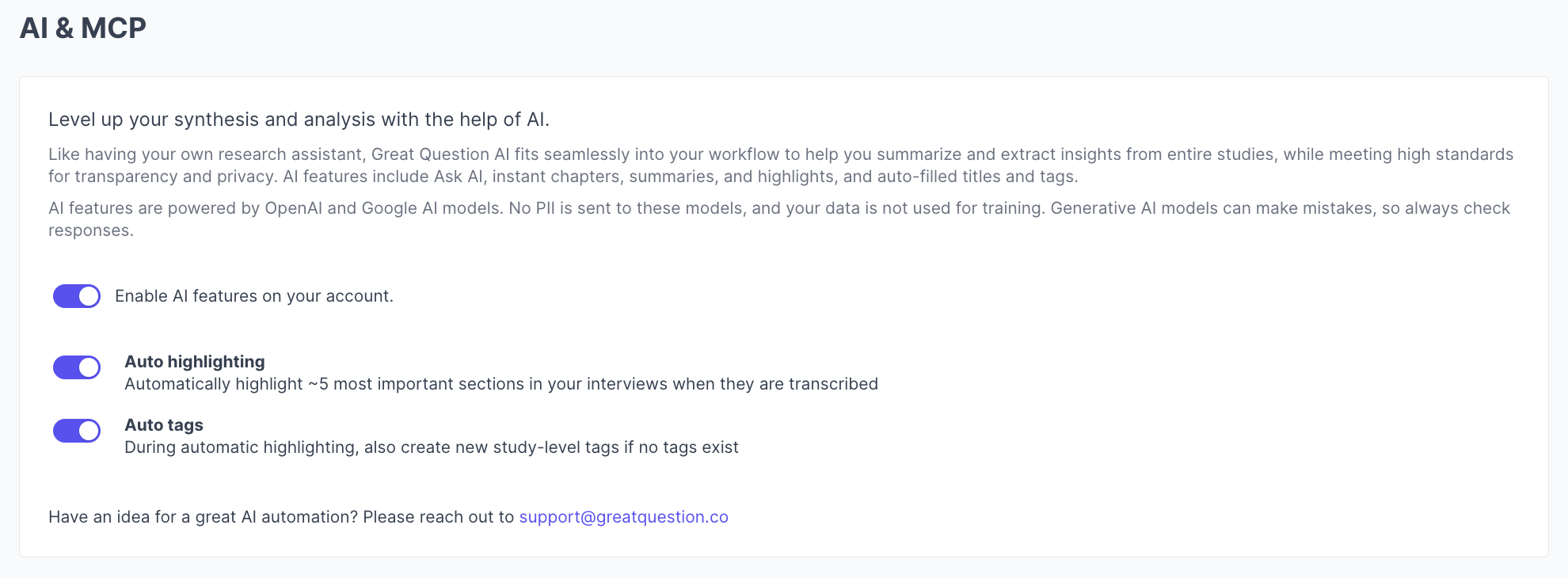
AI features are turned on and off account-wide from **Settings → [AI & MCP](https://greatquestion.co/ai_preferences)**, and only Admins can change this setting.
 1. Click your **profile name** in the top-left corner and go to **Settings**.
2. Select **AI & MCP**.
3. Review the feature details and toggle on **Enable AI features on your account**.
4. Optionally, **backfill existing data**, this generates interview summaries, chapters, and highlight titles for past sessions that don't already have them. Highlights and tags aren't backfilled.
You'll see a confirmation message when backfilling is in progress.
### Individual feature toggles
Beyond the main switch, the same settings page has finer-grained toggles for **auto-highlights** and **auto-tags**, so you can keep AI on for summaries and chapters while turning off automatic highlight or tag creation if your team prefers to do that manually.
### MCP Access and Skills
The same settings page also covers **MCP Access**, which lets external AI tools like Claude or Cursor query your repository through the [Great Question MCP server](/support/support/integrations/mcp), including a toggle to redact PII from what those tools can see, and **Skills**, where Admins can author reusable instructions for MCP tools to follow. Both are separate, plan-gated capabilities from the in-product AI features described above.
## Troubleshooting
| Issue | What's happening | How to fix it |
| ---------------------------------------------------- | --------------------------------------------------------------------------------------------------------------------------- | ------------------------------------------------------------------------------------------------- |
| I don't see the AI & MCP settings page | This is an Admin-only setting. | Ask an Admin on your account to enable it, or check your role. |
| AI features aren't available anywhere in the product | AI is disabled for your account. | Ask an Admin to enable it under **Settings → AI & MCP**. |
| Auto-highlights or auto-tags aren't showing up | The specific feature toggle is off, even though AI is otherwise enabled. | Check the individual auto-highlights/auto-tags toggles under **Settings → AI & MCP**. |
| Backfill stuck or incomplete | The backfill process was interrupted. | Reopen **Settings → AI & MCP** and restart the backfill. You'll see a confirmation once complete. |
| A past study never got a summary or chapters | Backfill only covers existing sessions once you run it — it isn't automatic for content that existed before AI was enabled. | Run **Backfill existing data** from the AI & MCP settings page. |
***
**Still need help?** Contact us at [support@greatquestion.co](mailto:support@greatquestion.co) — median response time is 19 minutes during [support hours](https://greatquestion.co/features/about-our-support-team).
1. Click your **profile name** in the top-left corner and go to **Settings**.
2. Select **AI & MCP**.
3. Review the feature details and toggle on **Enable AI features on your account**.
4. Optionally, **backfill existing data**, this generates interview summaries, chapters, and highlight titles for past sessions that don't already have them. Highlights and tags aren't backfilled.
You'll see a confirmation message when backfilling is in progress.
### Individual feature toggles
Beyond the main switch, the same settings page has finer-grained toggles for **auto-highlights** and **auto-tags**, so you can keep AI on for summaries and chapters while turning off automatic highlight or tag creation if your team prefers to do that manually.
### MCP Access and Skills
The same settings page also covers **MCP Access**, which lets external AI tools like Claude or Cursor query your repository through the [Great Question MCP server](/support/support/integrations/mcp), including a toggle to redact PII from what those tools can see, and **Skills**, where Admins can author reusable instructions for MCP tools to follow. Both are separate, plan-gated capabilities from the in-product AI features described above.
## Troubleshooting
| Issue | What's happening | How to fix it |
| ---------------------------------------------------- | --------------------------------------------------------------------------------------------------------------------------- | ------------------------------------------------------------------------------------------------- |
| I don't see the AI & MCP settings page | This is an Admin-only setting. | Ask an Admin on your account to enable it, or check your role. |
| AI features aren't available anywhere in the product | AI is disabled for your account. | Ask an Admin to enable it under **Settings → AI & MCP**. |
| Auto-highlights or auto-tags aren't showing up | The specific feature toggle is off, even though AI is otherwise enabled. | Check the individual auto-highlights/auto-tags toggles under **Settings → AI & MCP**. |
| Backfill stuck or incomplete | The backfill process was interrupted. | Reopen **Settings → AI & MCP** and restart the backfill. You'll see a confirmation once complete. |
| A past study never got a summary or chapters | Backfill only covers existing sessions once you run it — it isn't automatic for content that existed before AI was enabled. | Run **Backfill existing data** from the AI & MCP settings page. |
***
**Still need help?** Contact us at [support@greatquestion.co](mailto:support@greatquestion.co) — median response time is 19 minutes during [support hours](https://greatquestion.co/features/about-our-support-team).