

This feature needs to be enabled for your account. If you don’t see the option described below, reach out to your Customer Success Manager or support@greatquestion.co.
What is a concealed identity study?
A concealed identity study replaces your company and moderator details with neutral, non-identifying content everywhere a participant would normally see them. Instead of your company name and your moderator’s full name, participants see generic language and a placeholder display name like Moderator.Why it matters
Run unbiased competitive and brand research. Get authentic feedback when participants don’t know which company is behind the study — especially useful for well-known brands or when testing a competitor’s product. Meet privacy and compliance obligations. Some industries, contracts, and legal teams require that moderator identities and company affiliations stay hidden from participants. Protect your team in sensitive spaces. Researchers in fields like crypto, finance, or healthcare can run studies without exposing their personal identity to outside participants. Explore without revealing strategic intent. Investigate early-stage product ideas or sensitive topics without signaling which company is behind the research.Common use cases
Setting up a concealed identity study
Concealed identity is available on video call interviews that use external candidate recruitment. You can turn it on when you create the study, or any time before you invite participants.- Create a new interview study, or open an existing one, and go to the Plan step.
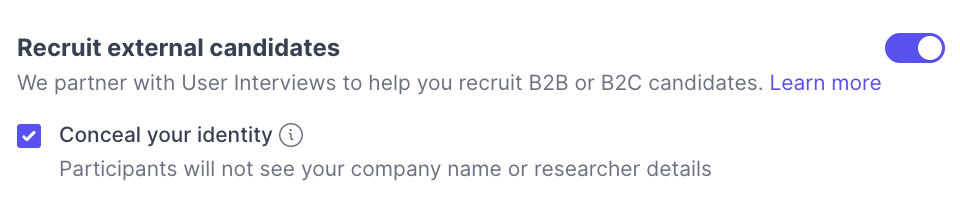
- Turn on Recruit external candidates.
- Check the box for Conceal your identity.
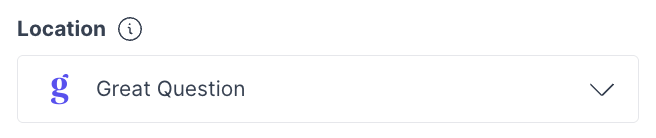
- For the call provider, the study automatically switches to the Great Question video call feature, since third-party tools can’t fully hide your identity.
- Continue building the rest of the study, screener, calendar, incentives, and so on as you normally would.
The Great Question video call feature
Concealed identity studies always use the Great Question video call feature for the interview itself, rather than a third-party provider. This matters because tools like Zoom, Google Meet, and Microsoft Teams typically show the moderator’s full name and can leak company information through the meeting URL. Native calls hosted by Great Question. No external integration or vendor security review required, and no company subdomain exposed in the call link. Automatic recording. Recordings start when the call begins and land directly on the participation page once it ends. A built-in waiting room. The host admits participants when ready; moderators can also join as silent observers. Concealed display names. The first moderator on the call appears as Moderator, the second as Moderator 2. Moderators can override this with their first name before joining if they’d rather not use the default.What’s different in a concealed call
The interview session displays as “Interview with [participant’s first name]” rather than including the moderator’s name and company. Inside the call, participants see only the moderator’s display name, never a real email, full name, or company affiliation. Moderators get a reminder in the waiting room not to reveal their identity once the call starts.The participant experience
Participants encounter neutral, non-identifying content everywhere your company would normally appear. Recruitment emails. These come from your external recruitment partner rather than the Great Question platform, and don’t mention your company name in incentive delivery or redemption. Landing and screener pages. Company logos are removed, and consent copy that would normally reference your company switches to generic language like “this organization.” Booking and confirmation. Participants don’t see the moderator’s full name, email, or company on confirmation pages or in calendar invites, calendar events are routed through a Great Question-managed sender. The video call. Participants join through the Great Question video call feature and see only the moderator’s neutral display name; the call URL contains no company identifier. Consent. Consent checkboxes automatically switch to concealed-friendly wording that omits your company name.Best practices
Turn on concealment before inviting participants. Enabling it after content has already gone out won’t retroactively update what’s already been sent. Brief your moderators. Even with a default display name and a waiting-room reminder in place, moderators should avoid mentioning their name, role, or company out loud during the call. Double-check your custom copy. Great Question swaps in concealed-friendly defaults automatically, but custom screener questions, consent text you’ve written yourself, and your recruitment request’s title and description can still contain company references — review all participant-facing copy before you launch.Troubleshooting
Still need help? Contact us at support@greatquestion.co — median response time is 19 minutes during support hours.