Ask AI

Gina Romero Updated by Gina Romero

Ask AI

Search across every interview and unmoderated test in your repository — and get evidence-backed answers with verbatim quotes and full source attribution.

What is Ask AI?

Ask AI is an AI-powered research assistant built into your Great Question repository. Instead of manually searching through studies one at a time, Ask AI lets you ask a natural-language question and get structured, citation-backed answers drawn from every transcript in your account. It searches broadly first, then helps you zoom in on the patterns, quotes, and themes that matter.

Ask AI works at two levels: you can query across your entire repository for cross-study synthesis, or scope it to a single study or session for deeper analysis.

Why It Matters

Surface insights you didn't know existed. Ask AI searches all of your studies automatically. You don't need to know which study to check or what research has been done — it finds the relevant evidence for you.

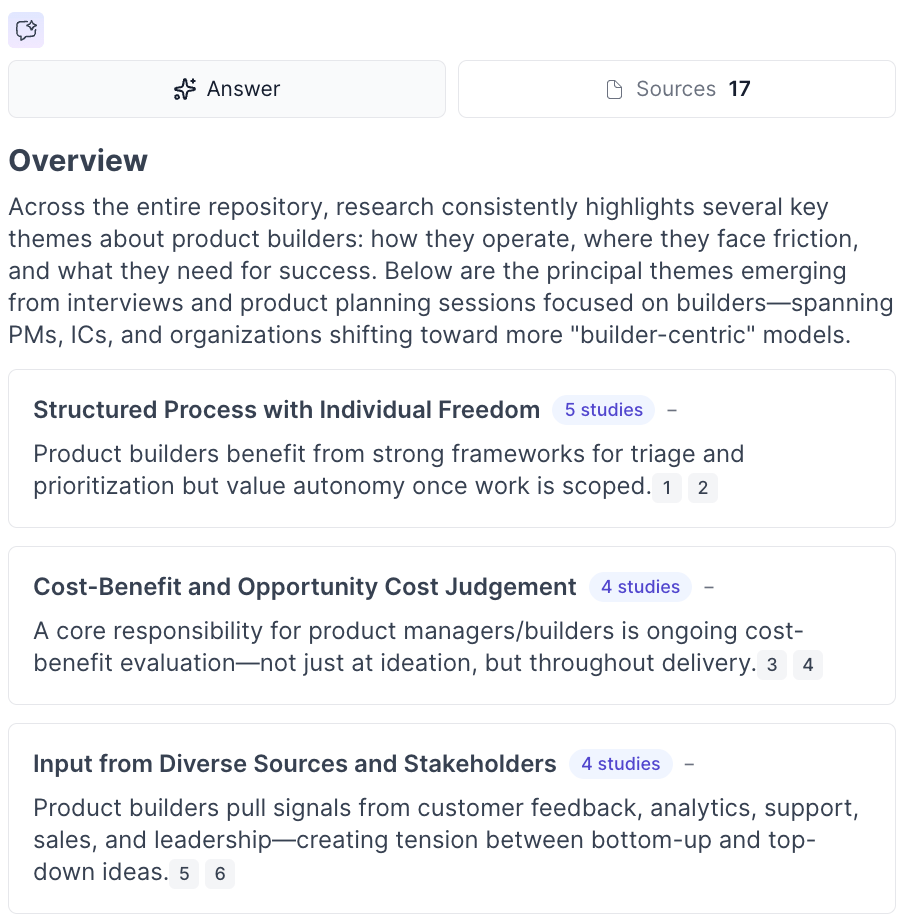
Get answers backed by real evidence. Every claim is tied to a verbatim participant quote with a link to the source session. Hover to preview, click to jump to that moment in the recording.

Synthesize across studies in seconds. Ask big-picture questions and get structured themes with supporting quotes spanning multiple studies and time periods — work that would take hours of manual transcript review.

Make research accessible to your whole team. Product managers, designers, and executives can self-serve simple questions without pulling researchers away from strategic work.

Who Is It For?

Role

Example question

How it helps

Designers

"What do users say about navigation?"

Surface patterns across studies you didn't know existed. Get the evidence you need to back your design decisions with confidence.

Product Managers

"Has feedback on Feature X changed since the update?"

Compare feedback across quarters automatically. See if complaints dropped. Get the quotes to back it up in sprint planning.

Researchers

"What did customers say about pricing?"

Stakeholders self-serve simple questions while you focus on strategic work. Ask AI amplifies your impact without adding to your workload.

Executives

"What evidence supports this product direction?"

Quick answers with proof for stakeholder presentations. Every insight backed by real customer quotes.

How to Access Ask AI

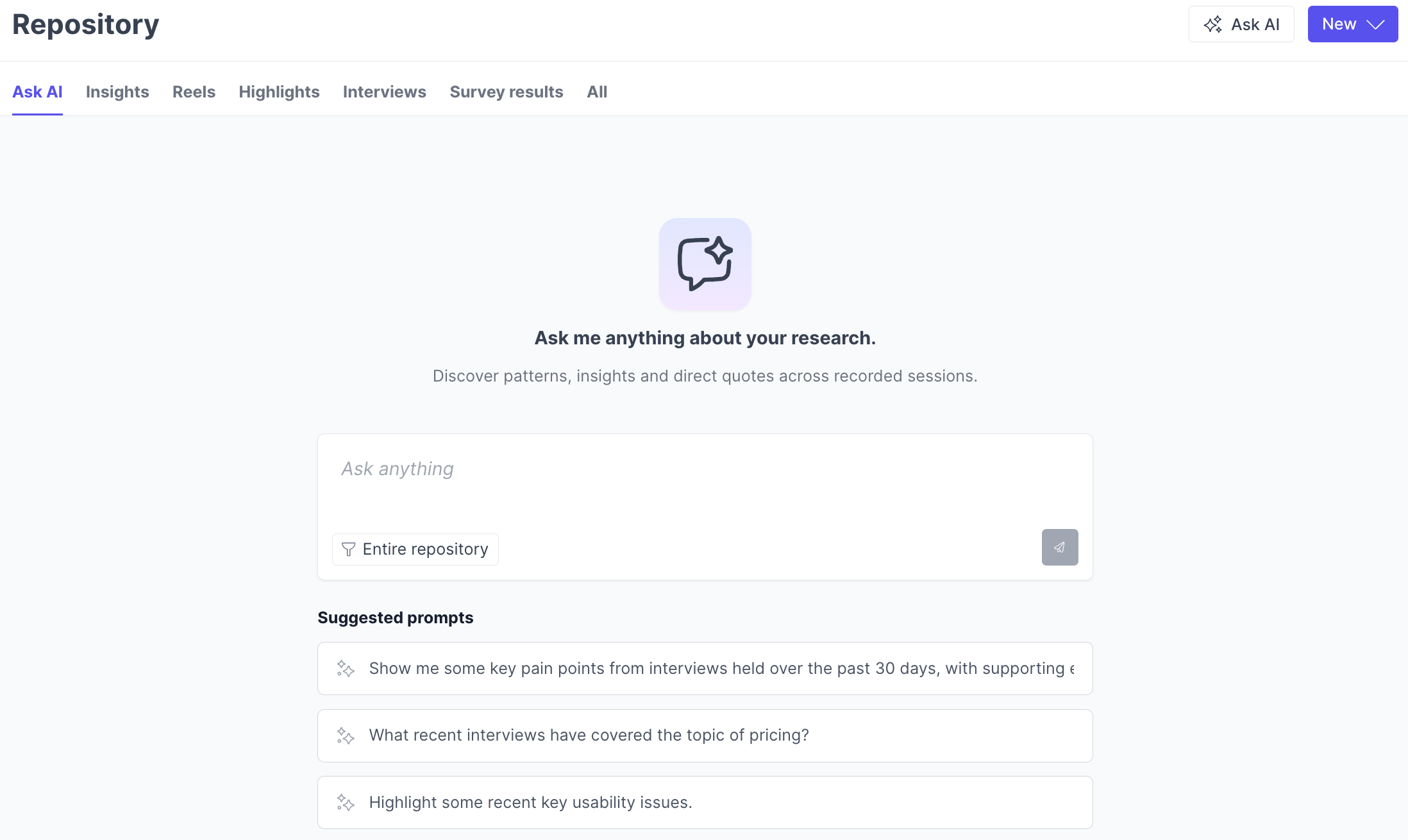
  1. Navigate to the Repository.
    1. Open the Ask AI tab in the header.
  2. Check the scope of your query. By default, Ask AI searches across the entire repository. Use the source filter to narrow to specific teams, studies, or sessions.
  3. Type a focused question (for example: "What onboarding issues did users mention?").
  4. Review the response, including linked quotes and study context.

Ask AI searches broadly by default, then groups results by theme and timeframe. You can ask follow-up questions to narrow results further — for example, by date range or company.

Note: You can multi-select teams, studies, or sessions to focus your query on exactly the interviews you want the AI to consider.
What Kinds of Questions Can I Ask?

Ask AI supports a wide range of query types, so you can explore your research from virtually any angle.

Query type

Example

What you get

Topic-based

"What feedback have users given about dashboard navigation?"

Thematic summary with quotes and temporal patterns

Time-based

"What usability issues came up in the last 6 months?"

Date-filtered results with temporal coverage

Comparative

"How has sentiment about our onboarding changed over time?"

Side-by-side evolution across time periods

Prevalence

"How commonly do users mention the export feature as a pain point?"

Exact counts and which studies/sessions mentioned it

Participant filtering

"What did enterprise customers say about pricing?"

Filtered results scoped to matching participants

Trend spotting

"What new themes are emerging in recent customer interviews?"

Temporal patterns with supporting evidence

You can also scope questions to specific teams, studies, or time periods for more targeted results.

How Ask AI Works

Ask AI is an agentic system that thinks strategically — not just a keyword search tool. When you ask a question, it develops a search strategy, chooses the right approach, and executes multiple searches with different angles to find the best answer.

Discovery-first search. Unlike traditional tools that demand filters upfront, Ask AI searches broadly first and shows you what exists. It reveals temporal patterns, coverage gaps, and refinement options based on what it actually finds.

Semantic understanding. Ask AI understands intent, not just keywords. Ask about "checkout problems" and it finds mentions of "payment failed," "couldn't complete order," and "card was declined" — even when the exact words don't match your query.

Cross-study synthesis. It automatically identifies patterns across different studies and time periods, revealing insights that would be missed by searching one study at a time. Results include prevalence counts (for example, "8 of 12 participants mentioned this") so you can gauge how widespread a theme is.

Key Features

Citations Linked to Recordings

Every answer includes verbatim quotes with full source attribution — session ID, study name, date, and participant context. Click any quote block to jump directly to that moment in the source recording. No more hunting for small citation links.

Collapsible Chat Sidebar and Full-Page Mode

Expand or collapse the AI Chat sidebar to control how much screen space it uses. Switch between the sidebar and a full-page view at any time — your conversation persists as you navigate between sessions.

Chat Sharing

Share AI Chat conversations with teammates via a link, making it easy to collaborate on insights discovered through Ask AI.

Create Highlights and Tags from Chat

When Ask AI surfaces a relevant transcript section, you can create highlights and assign tags directly from the chat interface — streamlining your analysis workflow without switching contexts.

Automatic Speaker Role Detection

Ask AI automatically identifies who is a participant and who is a moderator in your interviews, leading to more accurate insights and fewer irrelevant quotes in responses.

Study-Level Synthesis

When a study reaches 3 or more sessions with transcripts, you will automatically see AI-generated summaries, key insights, and structured themes — without any manual work. Drill down from themes to supporting quotes and video clips, and use an embedded Ask AI chat scoped to the study for deeper exploration.

Best Practices

Start specific, then broaden. Ask topic-based questions first (for example, "What do users say about the export feature?") rather than open-ended requests like "summarize everything." You will get tighter, more useful results.

Use follow-ups to refine. After your initial question, narrow with follow-ups like "Focus on feedback from the last quarter" or "What did enterprise customers say?" Ask AI maintains context across the conversation.

Review linked quotes to validate. Always check the source quotes behind a finding before sharing it. Click any quote block to jump to the full transcript and see the surrounding context.

Scope your search when you have a clear target. Use the source filter to select specific teams, studies, or sessions when you know where to look. Use the full repository scope when you are exploring or don't know what research exists.

Check transcript quality if results feel off. Ask AI is only as good as the transcripts it searches. If responses seem inaccurate or sparse, the underlying transcript quality is often the cause.

Trust and Security

Every safeguard is built in from the start, so you can share findings with confidence.

Guarantee

Description

Evidence-based only

Every claim is backed by verbatim quotes from your actual research. If the evidence is not there, Ask AI tells you instead of inventing something.

PII protection

Speaker identification uses handles only. Real names never surface in AI responses.

Relevance verified

Ask AI validates that retrieved content actually answers your question before including it. No filler, no tangential results.

Confirmation bias prevention

Ask something vague and Ask AI asks clarifying questions first. It helps you ask better questions, not just find convenient answers.

Role-based permissions

Granular visibility controls and data retention policies keep your research accessible to the right people.

Enterprise compliance

SOC 2, GDPR, and HIPAA compliant with enterprise-grade infrastructure and audit-ready certifications.

How Does Ask AI Differ from Study-Level Ask AI?

Ask AI (repository-level) searches across all interviews in scope to surface patterns and quotes spanning multiple studies. Use it when you are synthesizing, exploring, or don't know which study has the answer.

Ask AI in a study or session answers questions within a single study or session. Use it when you are deep in one interview and want to find specific moments or themes within that context.

Troubleshooting Ask AI

Issue

What's Happening

How to fix it

Ask AI returns no results or says "not found"

The transcripts in scope may not contain content related to your question, or the sessions you have access to don't cover that topic.

Broaden your search scope by removing source filters. Try rephrasing your question with different terminology. Confirm that the studies you expect to search actually have completed transcripts.

Results seem inaccurate or low quality

Transcript quality directly affects the quality of Ask AI responses. Poor audio, heavy crosstalk, or auto-generated transcripts with errors can produce misleading results.

Review the source transcripts behind the cited quotes to check for transcription errors. If transcripts are consistently low quality, consider re-uploading higher quality recordings or editing transcripts manually.

Ask AI is not returning results from a specific study

You may not have permission to view that study, or the study may not have transcribed sessions. Ask AI only searches studies and sessions you have access to.

Confirm you have access to the study by navigating to it directly in the Repository. Check that the study has at least one session with a completed transcript. If your account uses team-based access control, verify the study belongs to a team you are a member of.

Responses are missing context or feel incomplete

Your question may be too broad for Ask AI to synthesize effectively, or there may be limited coverage on the topic across your repository.

Ask a more specific, topic-focused question rather than a general "summarize everything" request. Use follow-up questions to narrow by timeframe, participant segment, or theme.

Citations link to unexpected or irrelevant sessions

Ask AI uses semantic search, which means it matches on meaning rather than exact keywords. Occasionally this surfaces content that is related but not directly on point.

Review the linked quotes to confirm relevance. If a result is off-target, refine your question with more specific language or scope it to particular teams or studies using the source filter.

Ask AI tab is not visible in the Repository

The feature may not be enabled for your account, or you may be on a plan that does not include Ask AI.

Contact your account administrator to confirm that Ask AI is enabled. If you believe it should be available, reach out to [email protected].

Responses take a long time to generate

Ask AI searches across your entire repository by default. Accounts with very large numbers of studies and transcripts may experience longer response times.

Narrow your search scope using the source filter to select specific teams or studies. Asking more targeted questions also helps reduce response time.

Moderator quotes are appearing in results

In rare cases, speaker role detection may not correctly distinguish between participants and moderators.

Review the source session to confirm speaker roles. If roles are misassigned, editing the transcript's speaker labels in the session will improve future results.

FAQs

How does Ask AI prevent hallucinations?

Every answer is grounded in your actual research data. Each claim is tied to a specific verbatim quote from a specific session, so you can verify any finding in one click. If the evidence is not in your repository, Ask AI tells you "not found" rather than making something up. It also validates that retrieved content actually answers your question before including it.

Can my whole team use Ask AI?

Yes. Ask AI is designed for researchers, product managers, designers, and executives alike. Researchers can use it for deep synthesis across studies, while stakeholders can self-serve simple questions without needing to wait. Granular role-based permissions let you control exactly who has access to which data and features.

How is participant privacy protected?

Participant privacy is built into the foundation. Speaker identification uses handles only, so real names never surface in AI responses. Great Question is SOC 2, GDPR, and HIPAA compliant, with fine-grained visibility controls and data retention policies to keep your research secure and audit-ready.

Does Ask AI work with all research methods?

Yes. Ask AI works across every research method supported by Great Question, including interviews, prototype tests, card sorts, surveys, and unmoderated tests. It searches transcripts, summaries, highlights, and tags from all of these study types. The more research you run, the more valuable Ask AI becomes as your repository grows.

What sessions can I access when using Ask AI?

Ask AI respects all existing team permissions and study visibility settings. You can only search across studies and sessions you already have permission to view. If your account uses team-based access control, Ask AI only searches content from studies in your teams or workspace-affiliated studies. Your Ask AI conversations are private to you — other team members cannot view your chat history.

What is a research repository?

A research repository is a centralized system where teams store, organize, and retrieve findings from user interviews, surveys, usability tests, and other research methods. Instead of insights scattered across Google Docs, Slack threads, and slide decks, a research repository makes everything searchable and reusable. Great Question's AI-powered research repository goes further — you don't just store research, you can query it in natural language and get evidence-backed answers across every study your team has ever run.

How does AI help with qualitative research?

AI transforms qualitative research at every stage. During analysis, it generates structured summaries and identifies themes across user interviews automatically — what used to take days of manual coding. For synthesis, AI connects patterns across multiple studies so you can see what 50 interviews say about a topic without re-reading transcripts. And with Ask AI, anyone on your team can query your entire research repository in plain language and get answers grounded in verbatim participant quotes.

Still need help? Contact us at [email protected] — we're happy to help!

How did we do?

Using AI in Great Question

Contact